How to use CrowdWisdomTrading, screen by screen
A plain-English manual for every feature: Weekly, Daily and Value Wisdom, CrowdPulse, CrowdMap, Chat with Traders and the Track Record. Where each one is, when to use it, and how to read every number. All screenshots are from the live product.
Quick start: your first 5 minutes
New here? Do these six steps once and you have used the core of the product.
Sign up with your email. You get 20 free full-detail previews and a free chat trial. No card needed.
It is the first item in the left menu. New setups arrive every Monday, about two hours before the U.S. open.
Type it in the search bar, or use the filters: market (FX, crypto, U.S.), long or short, and minimum Risk/Reward.
You get entry, two targets, two stops, the write-up, the CrowdMap, crowd sentiment and every past signal on that ticker.
The star saves a ticker to your favorites. The same stars work in Weekly, Daily and CrowdPulse.
We give you the plan and the evidence. You decide, and you place any trade in your own brokerage account.
Where to find what
Every feature is in the left menu of your dashboard. Pick the one that answers your question.
| Feature | Answers the question | Updated | Access |
|---|---|---|---|
| Weekly Wisdom | What are the pros setting up for this week? | Monday, ~2h before U.S. open | Free previews · Pro unlimited |
| CrowdMap & Pro Crowd bar | Where does the crowd put its targets, stops, support and resistance? | With each analysis, last 30 days | Inside every full analysis |
| Daily Wisdom (Beta) | What is the crowd's plan for today's session? | Every trading day, ~1h before U.S. open | Free previews · Pro unlimited |
| Value Wisdom | Is this a good long-term buy, and at what price? | Weekly | Free previews · Pro unlimited |
| CrowdPulse | Which tickers is everyone talking about, and did the mood just flip? | Daily, last 30 days | Free (tickers hidden) · Pro full |
| Chat with Traders | What are traders saying about X right now? | Live, last 3 days of posts | Free trial · Pro |
| Track Record | Can I trust these calls? | Daily | Everyone |
| Account & API keys | My plan, credits, Telegram, password, API access | — | Everyone · API is a separate plan |
Weekly Wisdom: your trade plan for the week
Each card is one ticker for the week, built from what thousands of professional traders posted and said. We keep only the calls where the pros covering that ticker agree, and turn them into one plan: direction, entry, targets and stops.
- Glance at the top bar: Market Sentiment tells you if the crowd leans long or short this week.
- Narrow the list: drag Min Risk/Reward, tap Top 30, or pick FX, Crypto, U.S., Long or Short.
- Read the card: direction, confidence, the chart with target and stop, and how far the plan has progressed.
- Tap the card ("Tap for details") to open the full analysis.
- Scroll down for the evidence: News Impact, the CrowdMap (next chapter), crowd sentiment and the ticker's signal history.
- Use Older week / Newer week at the bottom to look back at earlier weeks.
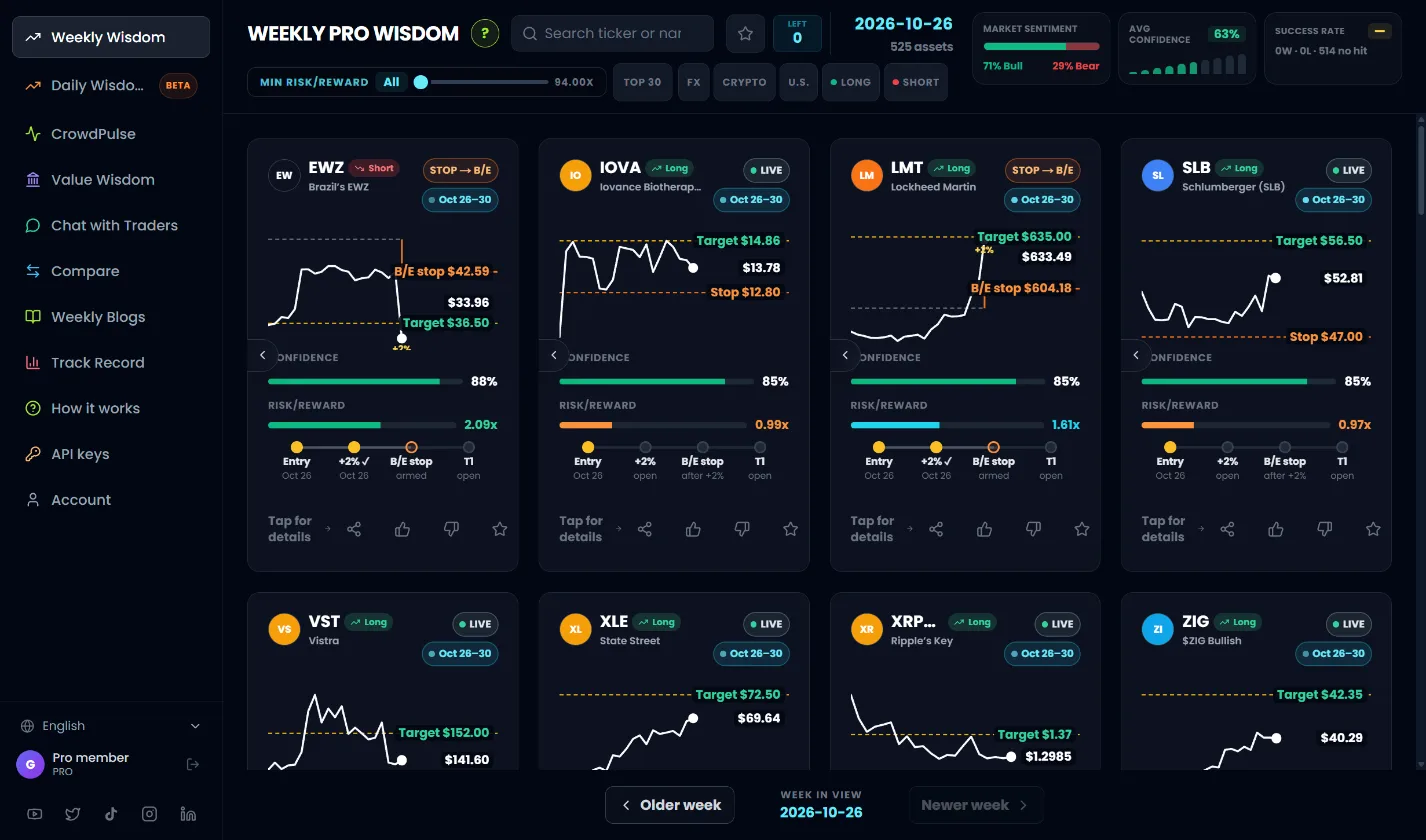
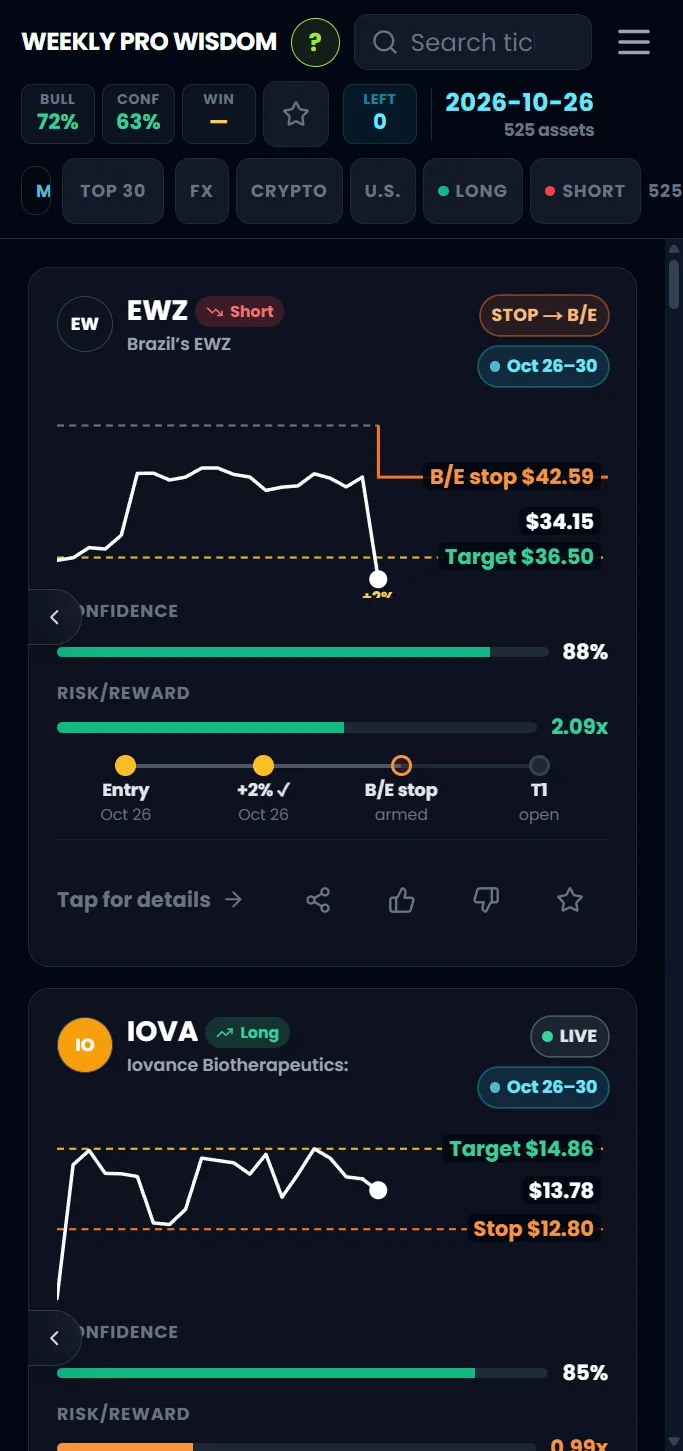
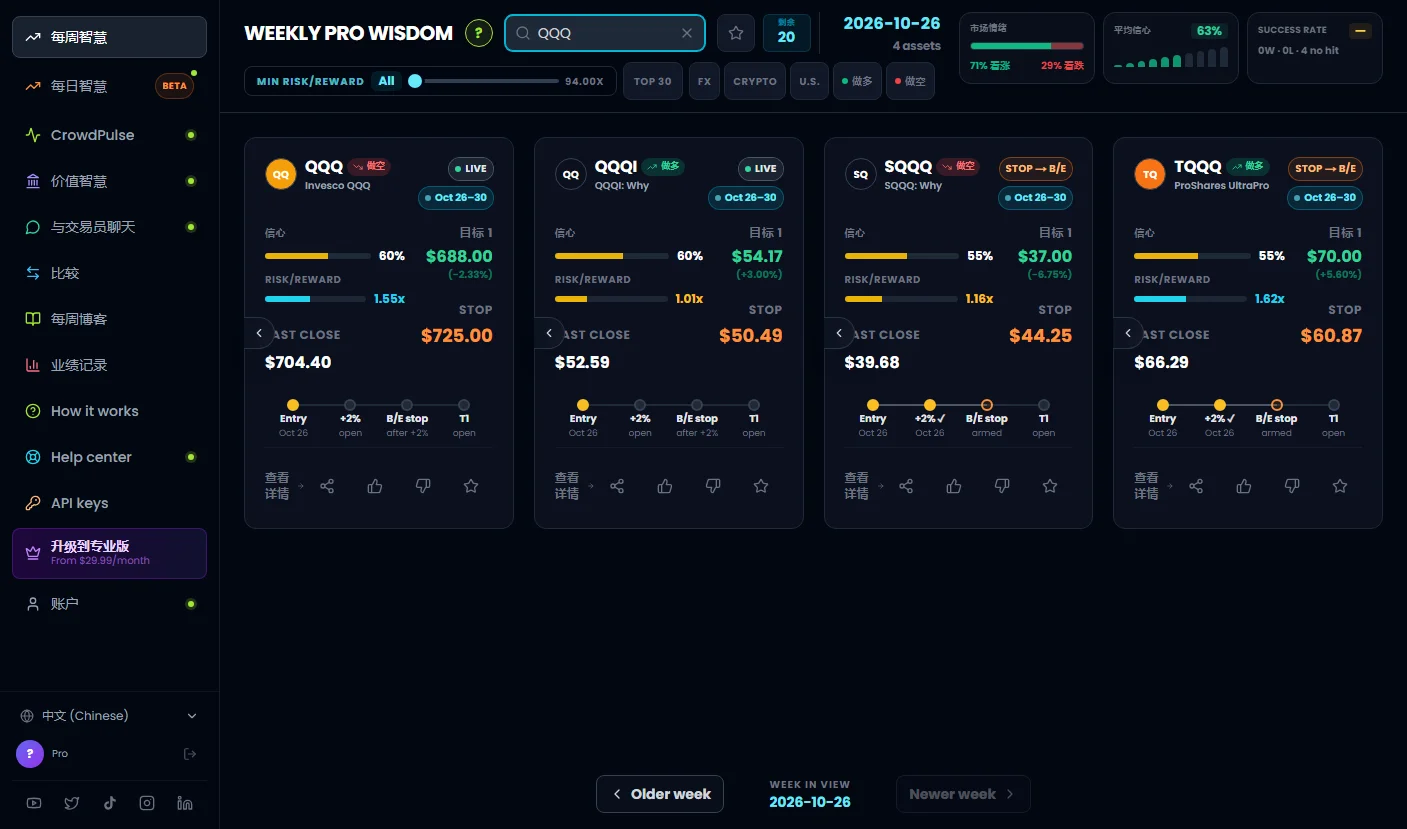
- 1Search and favorites. Type a ticker or company name. The star next to it shows only your favorites.
- 2Week and asset count. The signal week you are viewing, and how many tickers pass your filters.
- 3Market Sentiment. Share of long vs short setups this week. A quick read of the crowd's mood.
- 4Filters. Min Risk/Reward, Top 30, market and direction. Combine them freely.
- 5Setup card. One ticker, one plan. Tap it for the full analysis.
- 6Week navigation. Go back to older weeks to see how earlier plans played out.
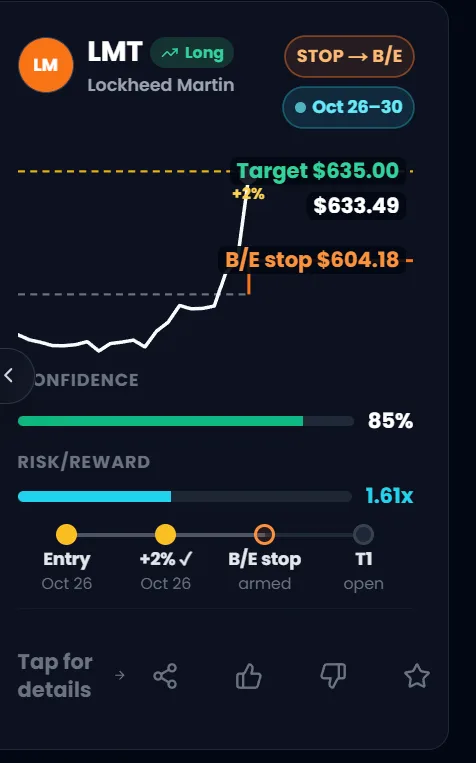
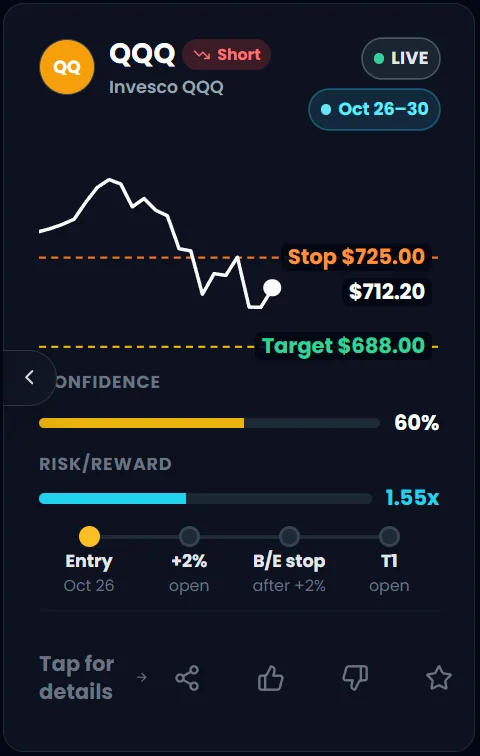
- 1Ticker and direction. Long = the crowd expects the price to rise. Short = to fall.
- 2Status. LIVE = plan is running. STOP → B/E = price moved +2% our way, so the stop moved to the entry price. You can no longer lose on this plan.
- 3Price chart with levels. The live price (white dot) against the target (green) and stop (orange).
- 4Confidence. How strongly the pros agree. Higher is stronger.
- 5Risk/Reward. Potential gain to target vs potential loss to stop. 2.0x means you aim to make twice what you risk.
- 6Plan progress. Entry → +2% → break-even stop → Target 1. Filled dots show what already happened, with dates.
- 7Tap for details. Opens the full analysis.
- 8Share, rate, star. Share the setup, give it a thumbs up or down, or add it to favorites.
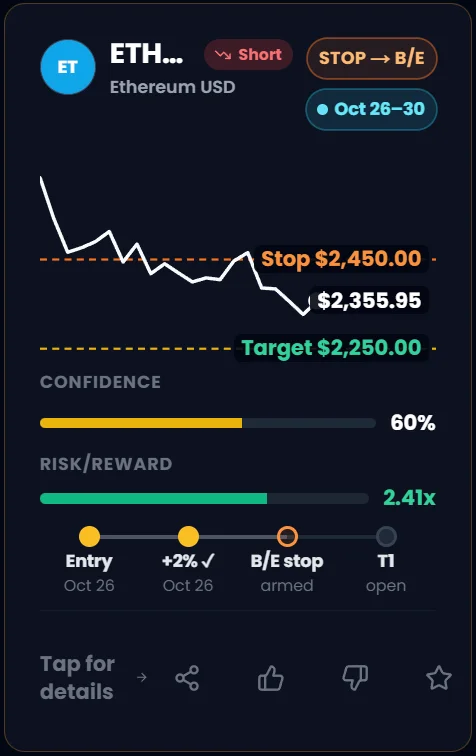
- 1STOP → B/E. Price moved +2% in the plan's direction, so the stop moved to the entry price.
- 2Plan progress. Entry and +2% are done; the break-even stop is armed; Target 1 is still open.

- 1Search. Find any ticker or company.
- 2Favorites. Show only the tickers you starred.
- 3Left. Free accounts: how many full-detail previews remain.
- 4Min Risk/Reward. Hide setups with weaker reward for the risk. Set it to All to see everything.
- 5Top 30. The 30 U.S. stocks with the highest Risk/Reward this week (Pro).
- 6Market. FX, Crypto or U.S. only.
- 7Direction. Long or Short setups only.
- 8Market Sentiment. Share of long vs short setups this week.
- 9Avg Confidence. Average strength of the setups on screen.
- 10Success Rate. Wins vs losses for the setups on screen that have already resolved.
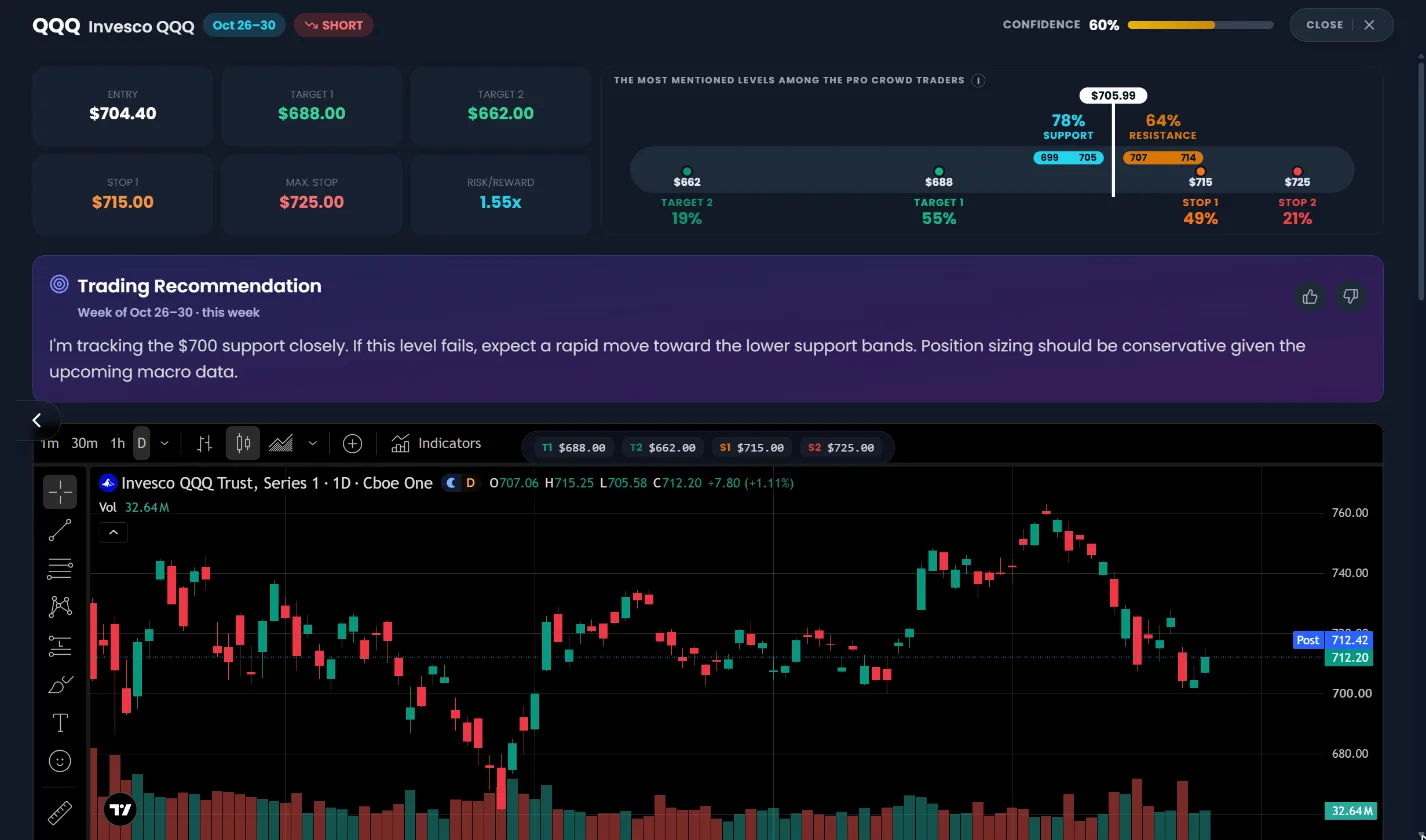
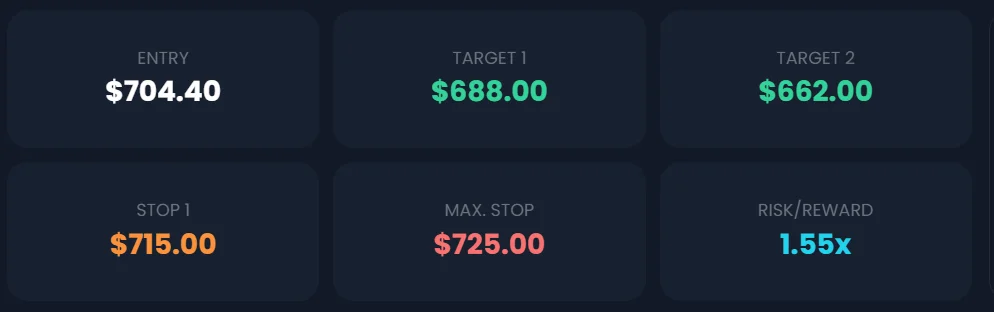
- 1The levels. Entry, Target 1, Target 2, Stop 1, Max Stop and Risk/Reward. Copy these into your broker.
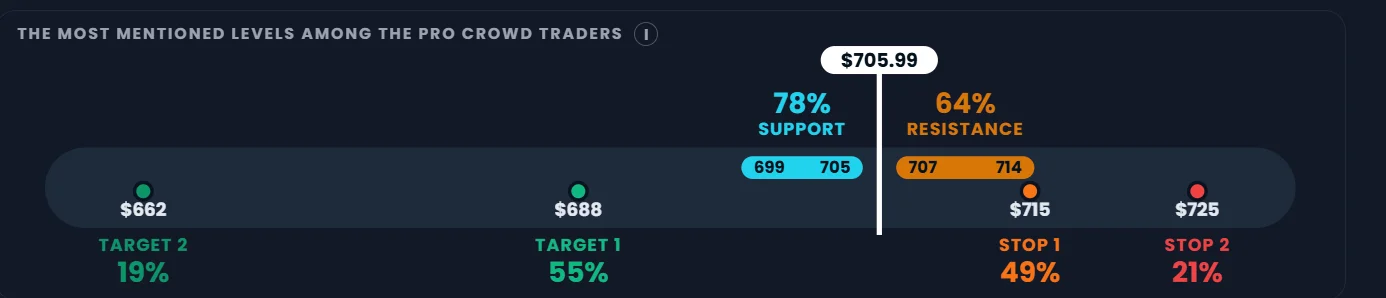
- 2Pro Crowd bar. Where the pros put their support, resistance, targets and stops. See the CrowdMap chapter.
- 3Trading recommendation. The plan in plain words: why, where to take profit, where to get out. Rate it with the thumbs.
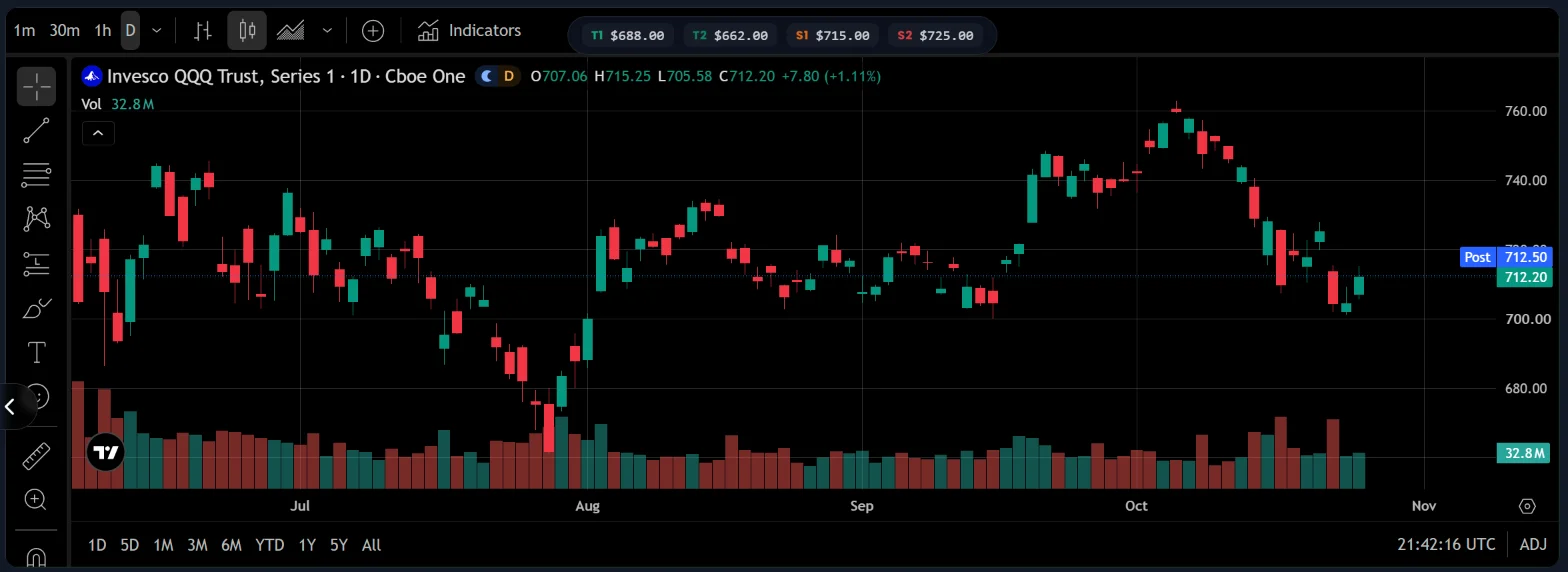
- 4Live chart. Full TradingView chart with the plan's levels marked (T1, T2, S1, S2).
- 5Confidence and close. Confidence for this setup. Close returns you to the cards.
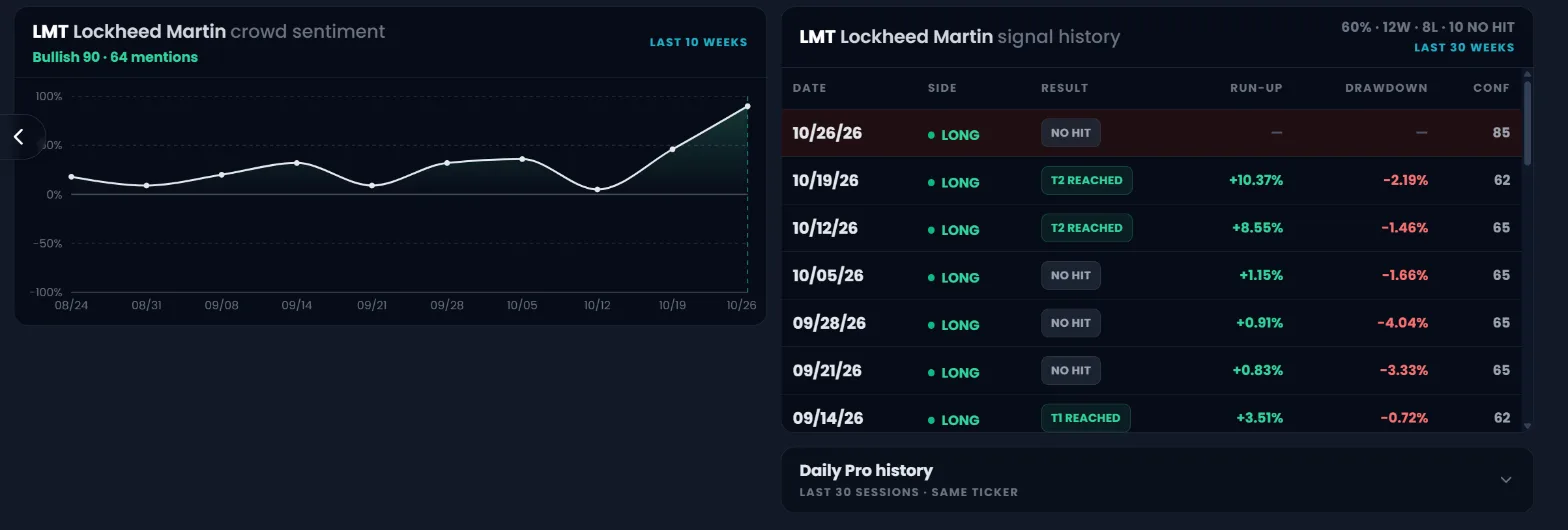
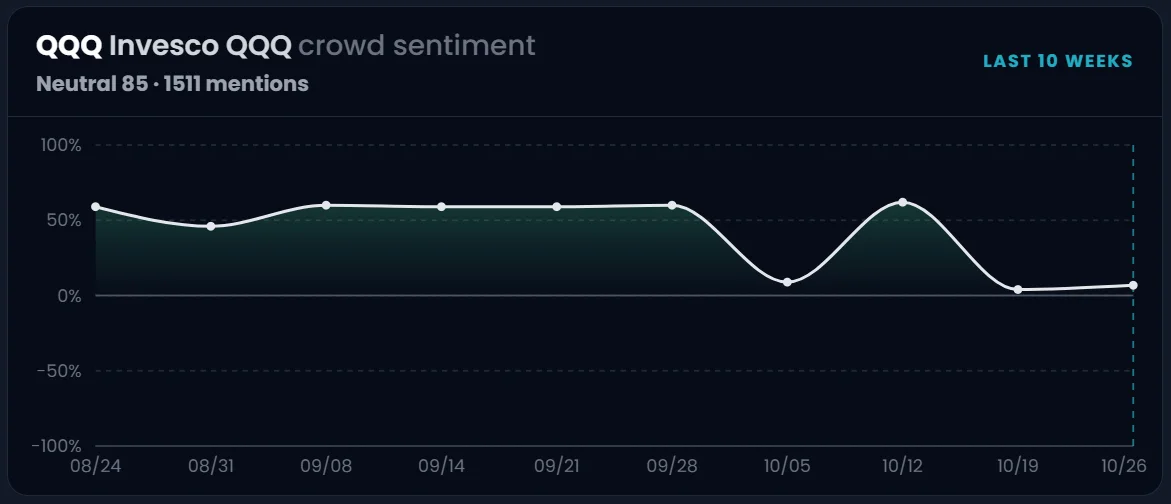
- 1Crowd sentiment. Last 10 weeks of pro conviction. Above 0% = bullish, below = bearish. Use it as context, not as the trade.
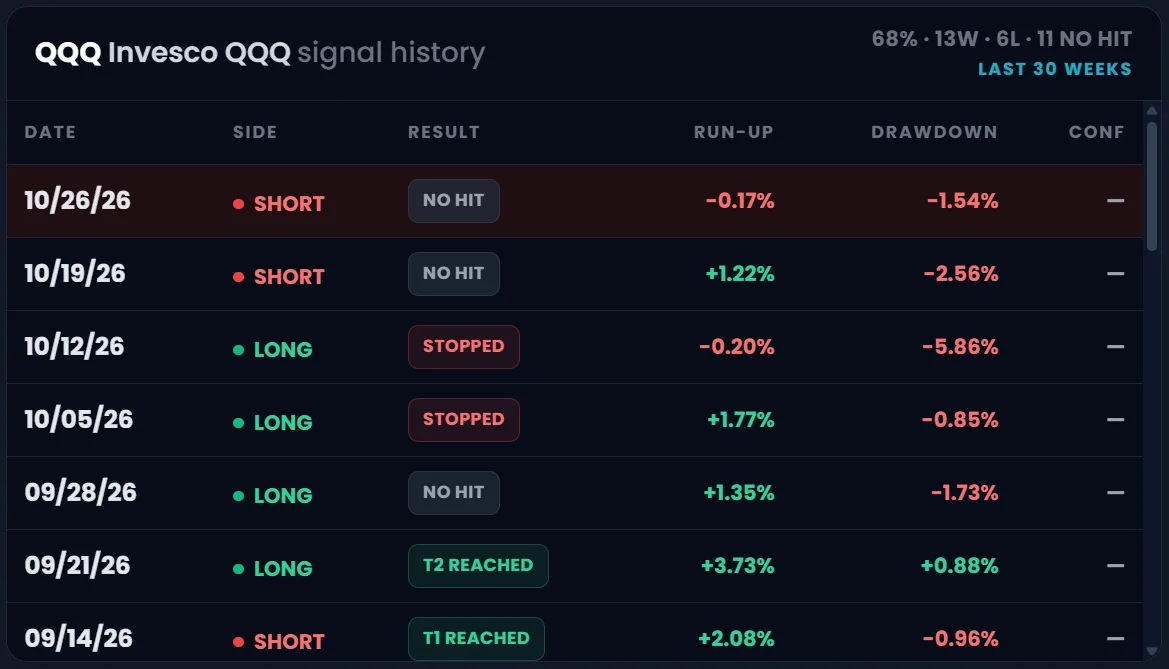
- 2Ticker win rate. Wins, losses and no-hits for this ticker over the last 30 weeks.
- 3Result. T1 / T2 reached, 2% move, Stopped, or No hit. Tap a row to load that week's plan.
- 4Run-up and drawdown. Best and worst move from entry that week. You can be in profit even on a No hit.
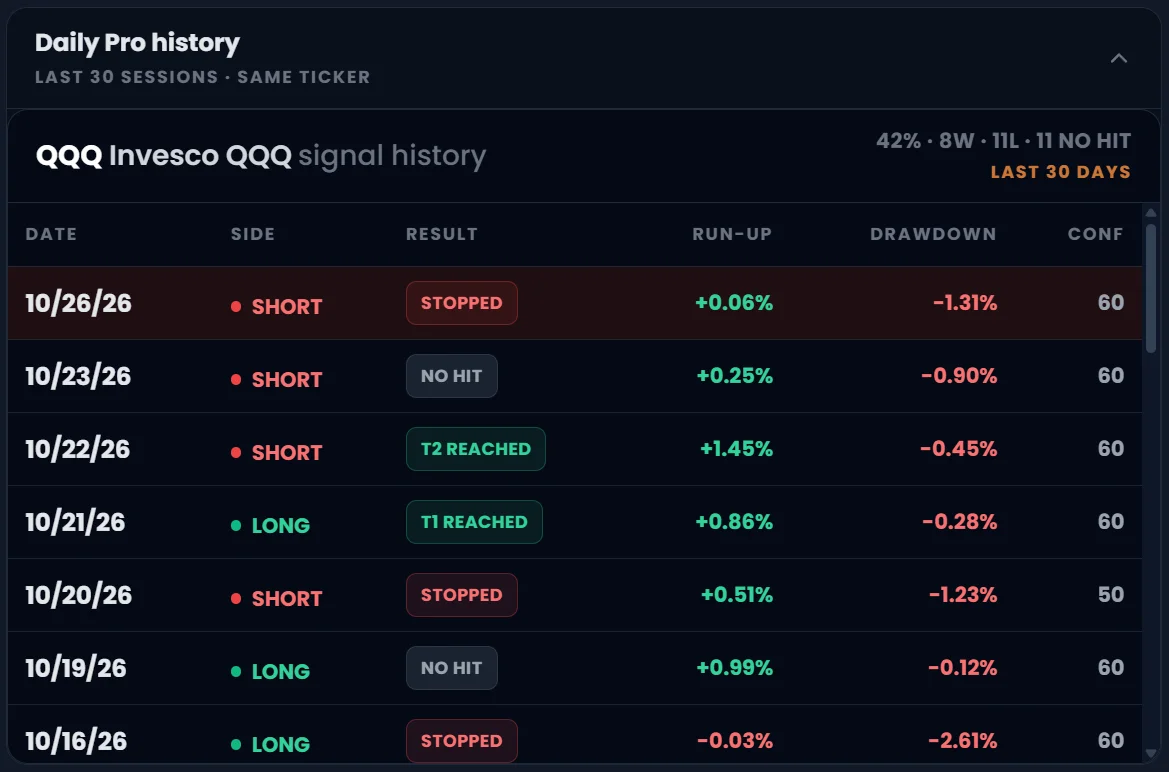
- 5Daily Pro history. Expand to see the same ticker's last 30 daily signals.
A weekly setup wins if it reaches Target 1, Target 2, or moves at least 2% in the forecast direction. If Stop 2 is hit first, it is a loss. If neither happens, it is a No hit and is left out of the win rate (but stays in the ledger).
Once price moves +2% in your favor, the plan moves the stop to your entry price (B/E). From then on the worst case is roughly zero, so a later reversal does not turn a good trade into a loss.
Press the green ? next to the page title for a guided tour of the screen you are on.
CrowdMap and the Pro Crowd bar: where the crowd puts its prices
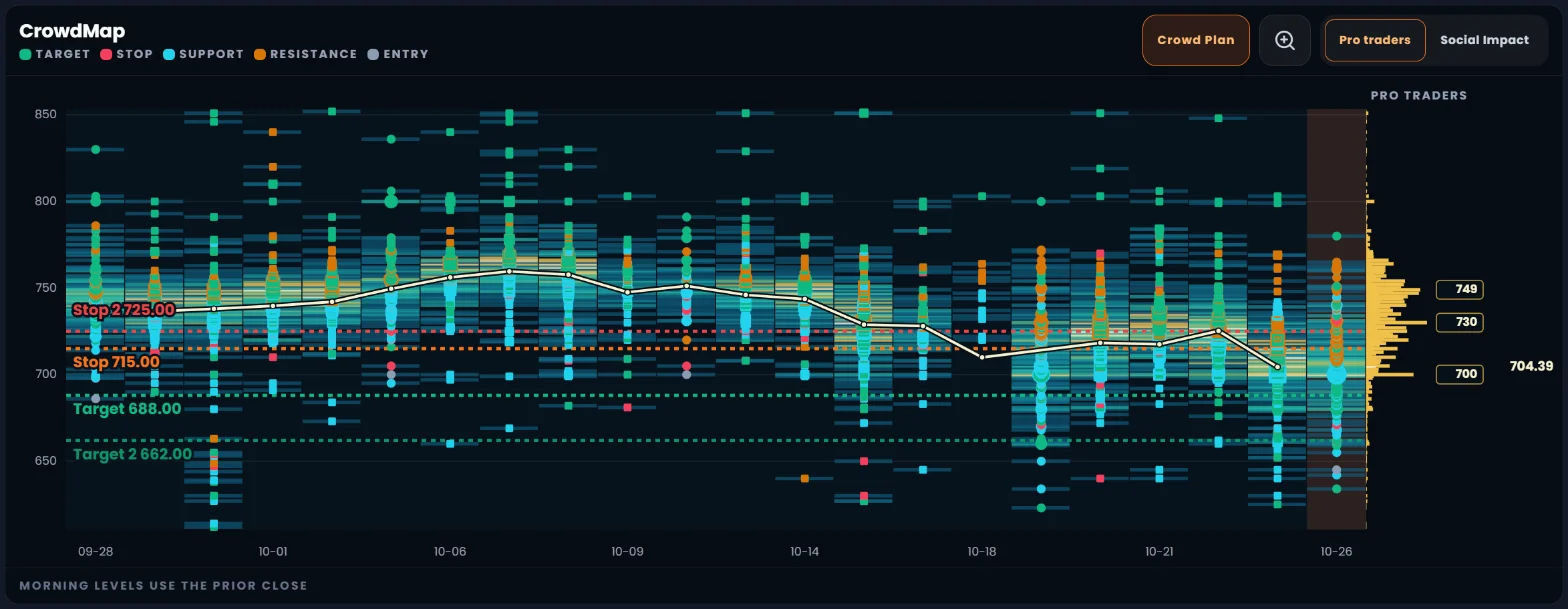
Every analysis shows two pictures of the prices traders named for that ticker. The Pro Crowd bar is the quick read: the most-called support, resistance, targets and stops. The CrowdMap is the full story: every price level the crowd named over the last 30 days, day by day, so you can see where opinions pile up.
- Start with the Pro Crowd bar at the top of the analysis: where is the price (white flag) compared with the crowd's support and resistance?
- Scroll down to the CrowdMap. Time runs left to right, price runs bottom to top.
- Look for clusters: many marks, bright heat and long gold bars at the same price mean many traders named that level.
- Compare the dashed Crowd Plan lines with those clusters. A stop just beyond a big support cluster is a well-placed stop.
- Hover or tap any mark to see its date, price, type and how many creators named it.
- Switch to Social Impact to weigh levels by audience size instead of number of traders. Use zoom to focus on 5% around the price.
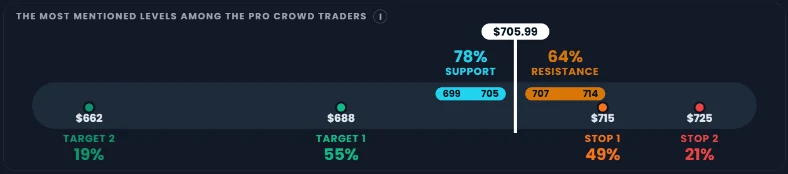
- 1Price now. The white flag is the latest price.
- 2Support zone. 78% of the pros who called a support put it between 699 and 705. Buyers are expected here.
- 3Resistance zone. 64% of the pros who called a resistance put it between 707 and 714. Sellers are expected here.
- 4Targets. The share of pros who gave a target at each price (Target 1, Target 2).
- 5Stops. The share of pros who gave a stop at each price (Stop 1, Stop 2).
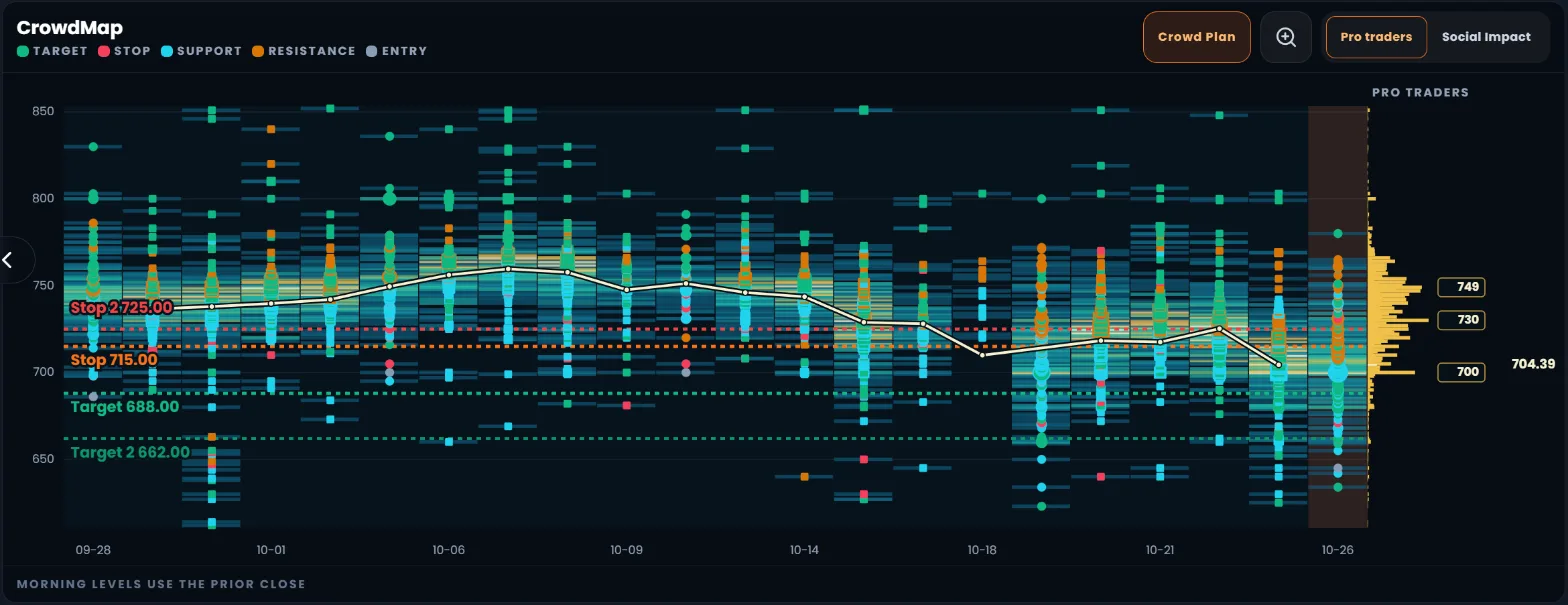
- 1Legend. Green = target, red = stop, blue = support, orange = resistance, gray = entry. Hover a name for its meaning.
- 2Crowd Plan. Shows or hides our plan's dashed lines.
- 3Zoom. Focus on 5% around the price, or go back to the full scale.
- 4Pro traders / Social Impact. Weigh each level by how many traders named it, or by how big their audience is.
- 5Crowd marks. Each mark is a price someone named. Bigger = more traders (or more audience). Monday is a circle, other days are squares.
- 6Heat. The colored background. Brighter and more yellow = more crowd weight at that price on that day.
- 7Price line. The cream line is the closing price the levels were built against.
- 8Crowd Plan lines. Our plan's targets and stops (dashed). They are the plan, not crowd marks.
- 9Today. The shaded column is the latest session.
- 10Crowd weight (gold bars). All 30 days added up by price. Longer bar = more opinion at that price. Not trading volume.
- 11Key levels and close. Boxed numbers are the prices with the most crowd weight. The number on the far right is the prior close.
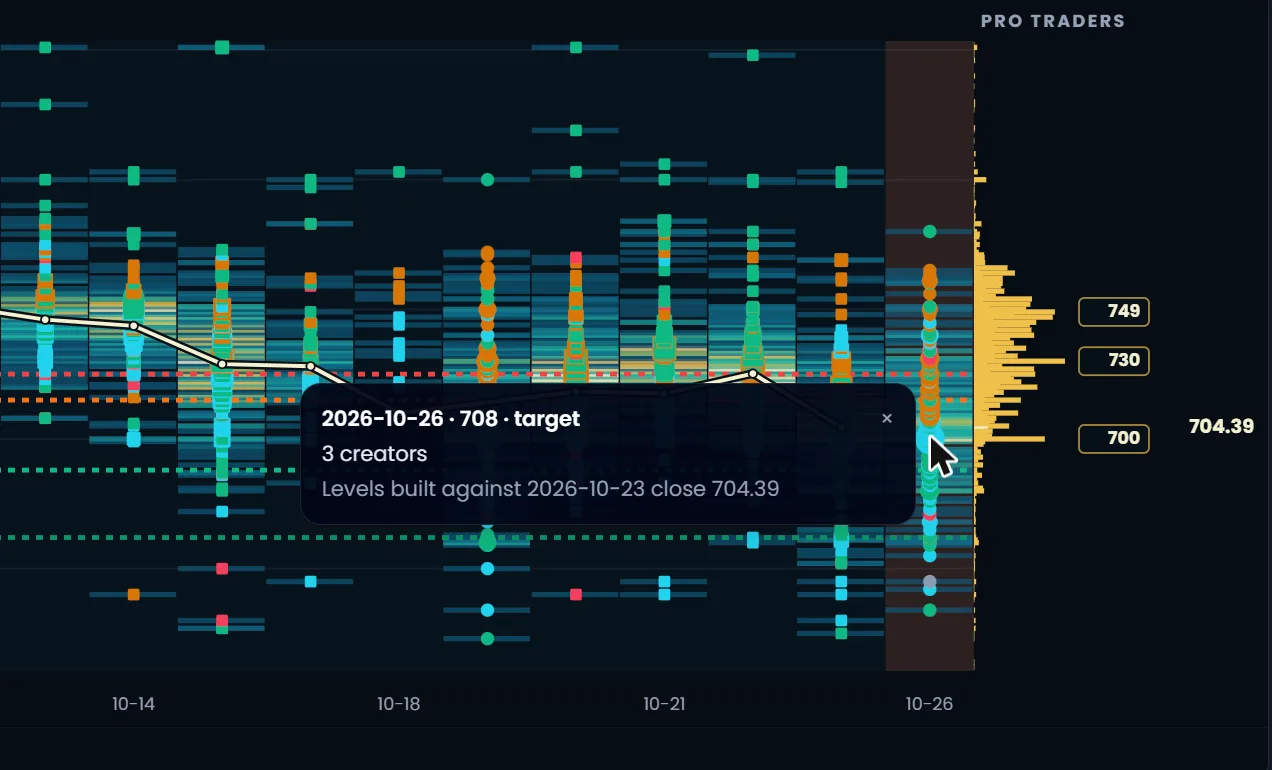
- 1Mark details. Date, price and type (here: a 708 target on Oct 26), how many creators named it, and the close it was measured against.
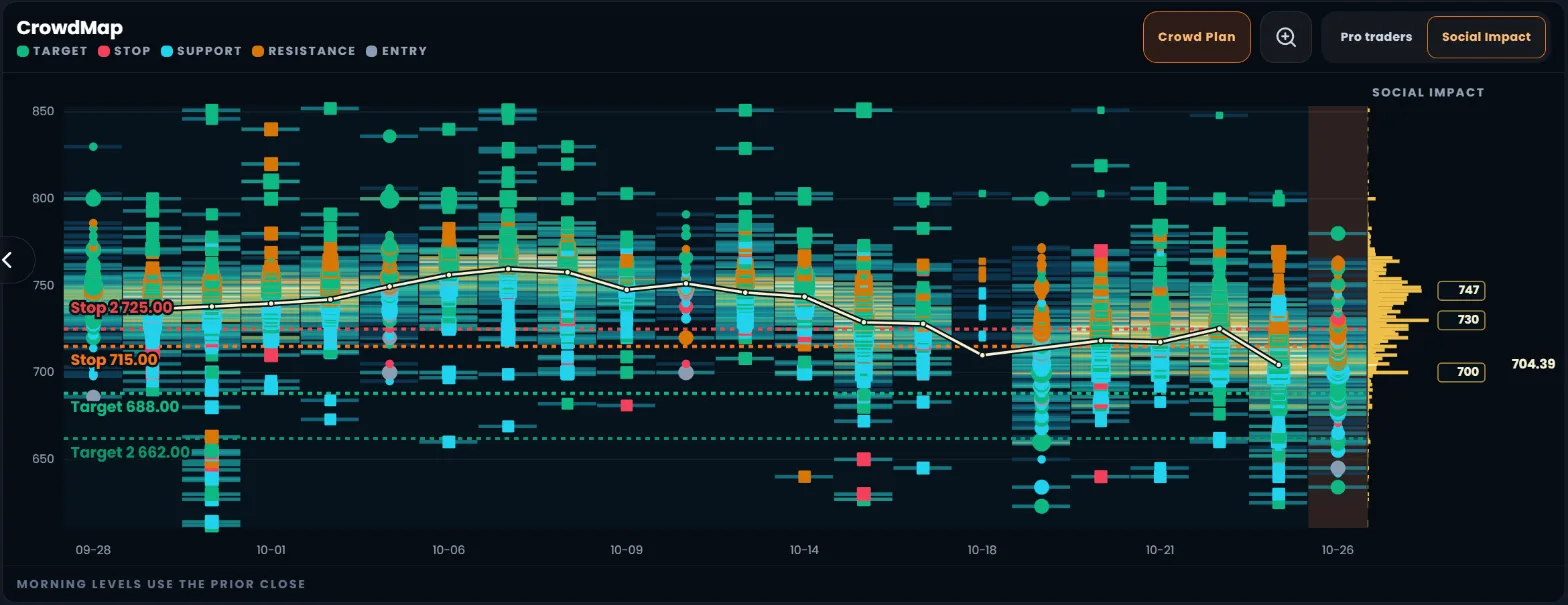
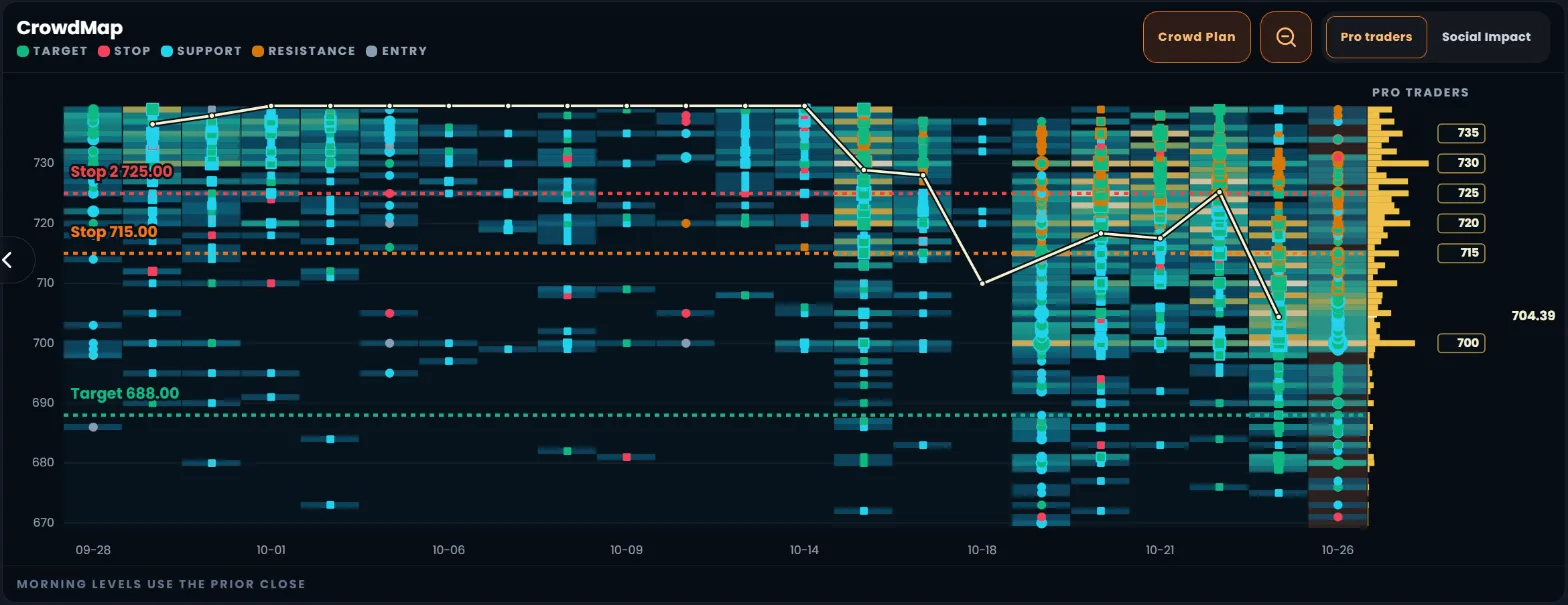
One trader naming a price is noise. Many traders naming the same price, day after day, is a level the market is likely to notice.
The bars show how much the crowd talked about each price, not how many shares traded there.
Thin tickers show "not enough data" until traders have named levels on at least 5 days. Big names like QQQ, SPY or NVDA always have plenty.
Daily Wisdom: the plan for today's session
The same kind of setup as Weekly, but for one trading day. Use it for session context and short trades. Keep Weekly Wisdom for your full-week plan. Daily Wisdom is in Beta.
- Open Daily Wisdom before the U.S. open.
- Use the same filters as Weekly: Min Risk/Reward, market and direction.
- Watch the status badge on each card. It updates as the session runs.
- Tap a card for the full plan and the ticker's last 30 daily signals.
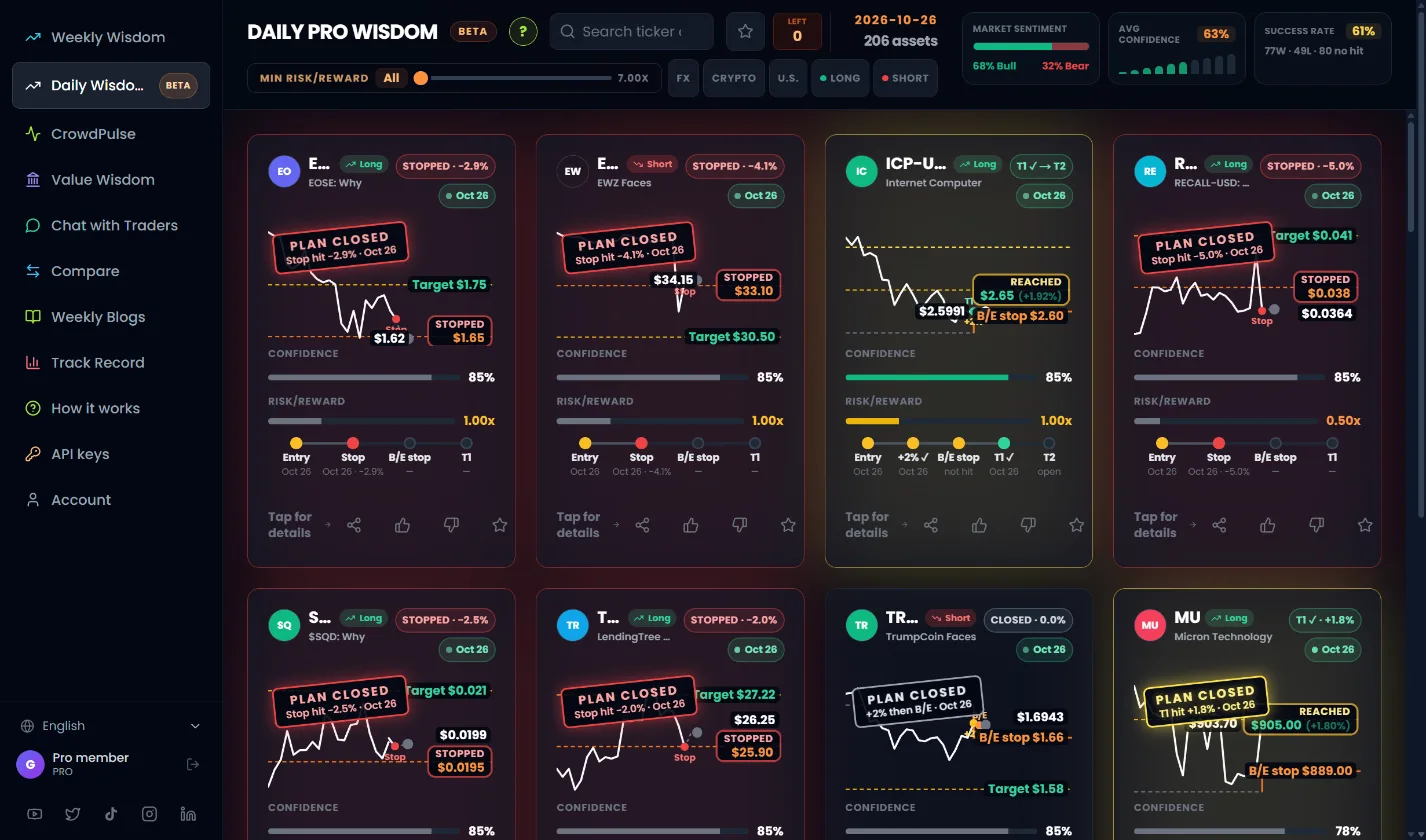
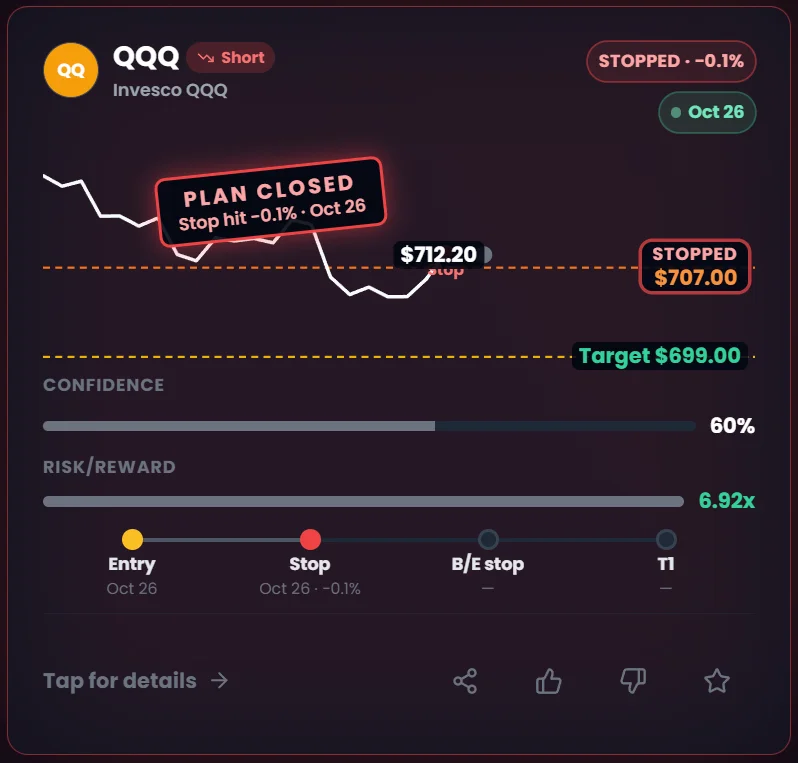
- 1Status badge. STOPPED, CLOSED, T1 ✓ → T2, or REACHED, with the result in %.
- 2Plan stamp. PLAN CLOSED or PLAN EXPIRED with the reason and date, so you know the plan is no longer active.
- 3Success Rate. Wins, losses and no-hits for the daily cards on screen.
- 4Today's crowd mood. Bull vs bear share and average confidence for today.
A daily row and a weekly row for the same ticker are different plans with different rules. Compare weekly with weekly and daily with daily.
Value Wisdom: long-term investing research
For investors, not traders. Each card is a long-term view on one company, built from four weeks of crowd discussion plus earnings reports. Tap it for a full research report with a fair value and the price where the stock becomes interesting.
- Pick U.S. or Crypto at the top, or search a company.
- Compare the CrowdWisdom 1-year target with the Wall Street (Yahoo) 1-year target.
- Tap the card to read the full value report.
- In the report, use the arrows to see earlier reports, and EN / HE to switch language.
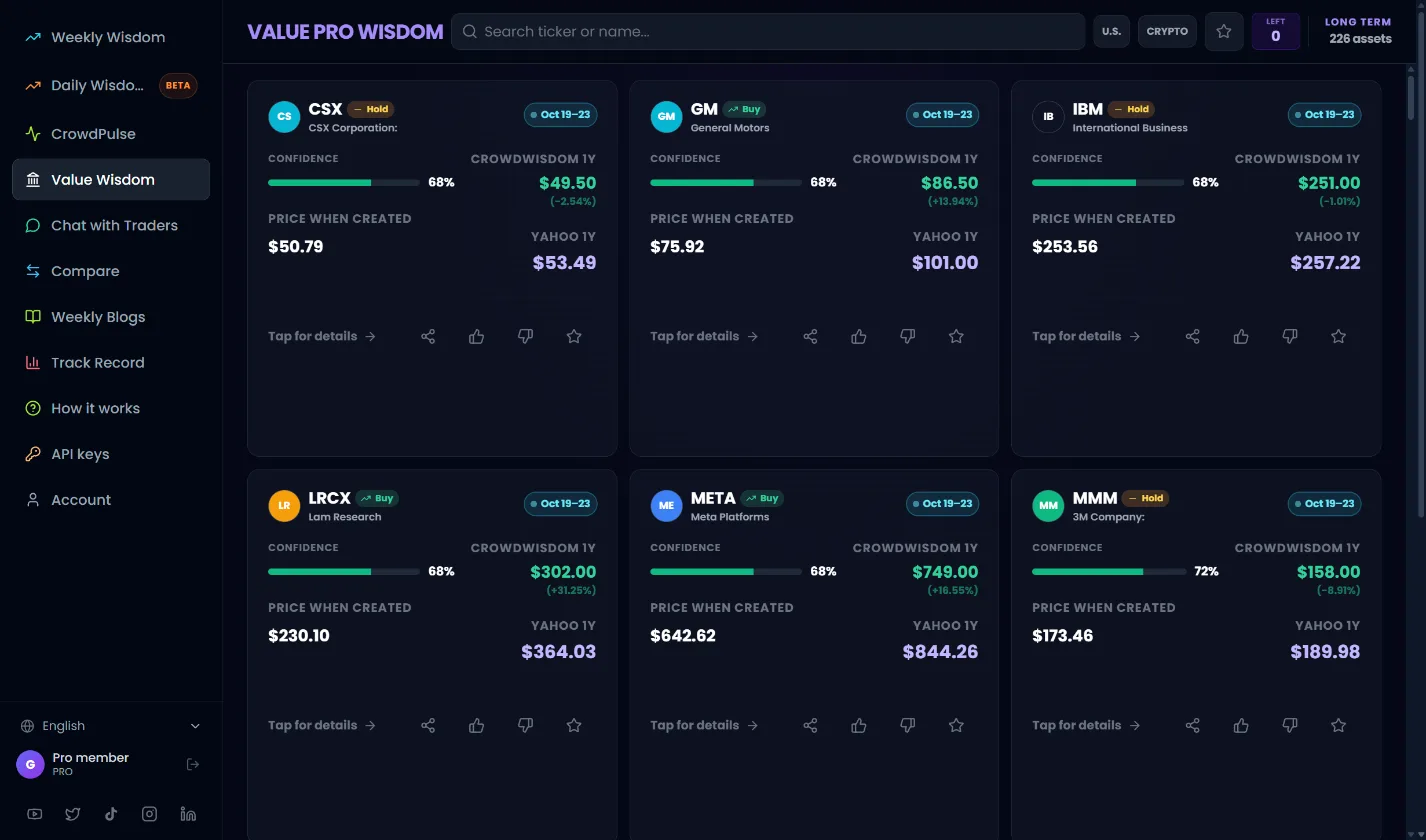
- 1Buy / Hold. The crowd's long-term view on the stock.
- 2Confidence. How strongly the sources agree.
- 3CrowdWisdom 1Y. Our 1-year price target, and the % from today's price.
- 4Yahoo 1Y. The Wall Street analyst consensus target, for comparison.
- 5Price when created. The stock price on the day the report was written.
- 6Market filter. U.S. stocks or crypto.
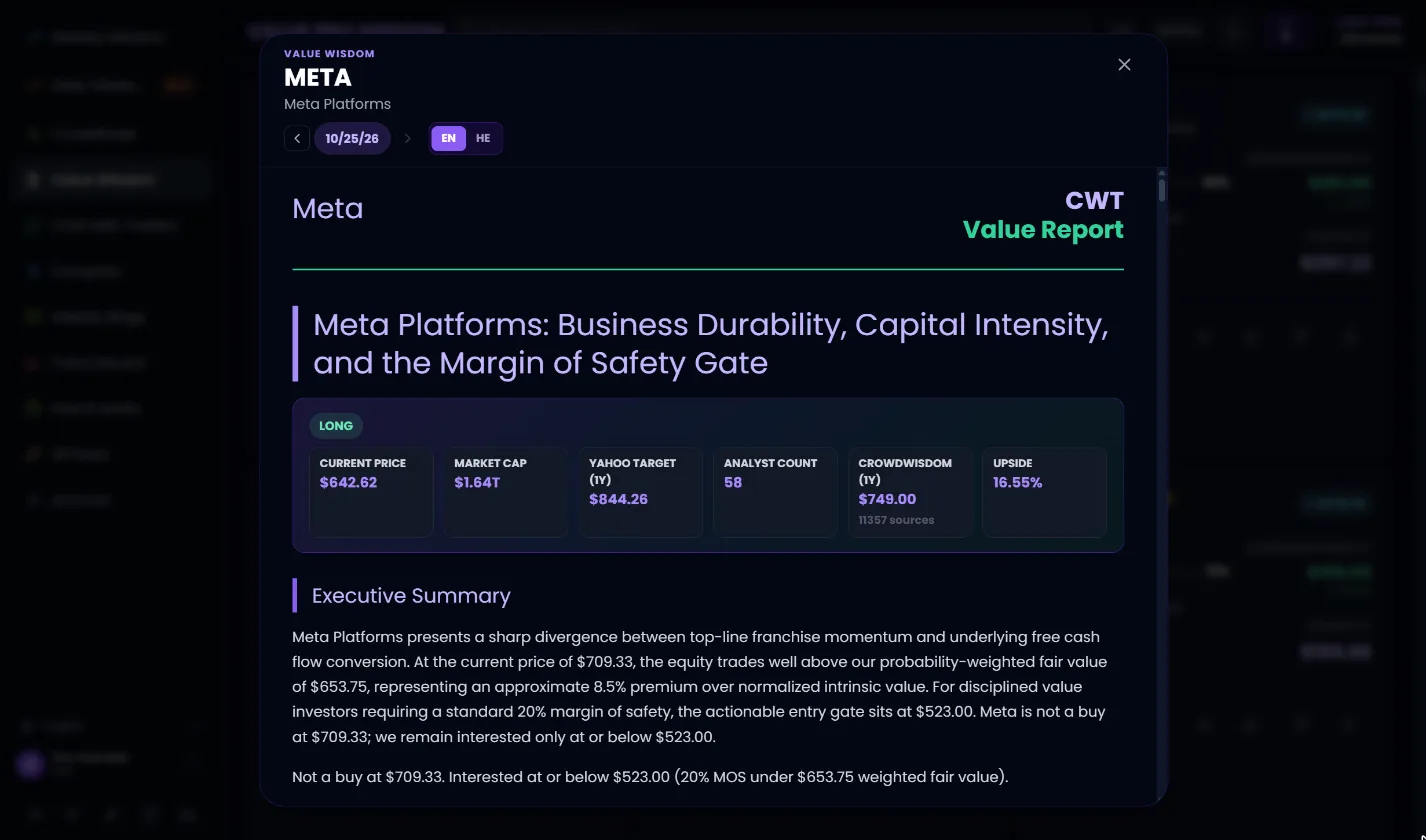
- 1Report date. Step back to earlier reports to see how the view changed.
- 2Language. Read the report in English or Hebrew.
- 3Key numbers. Price, market cap, Wall Street target, analyst count, our target, upside, and how many sources fed it.
- 4Executive summary. The bottom line: fair value and the price at which the stock is worth buying.
CrowdPulse: what the crowd is talking about
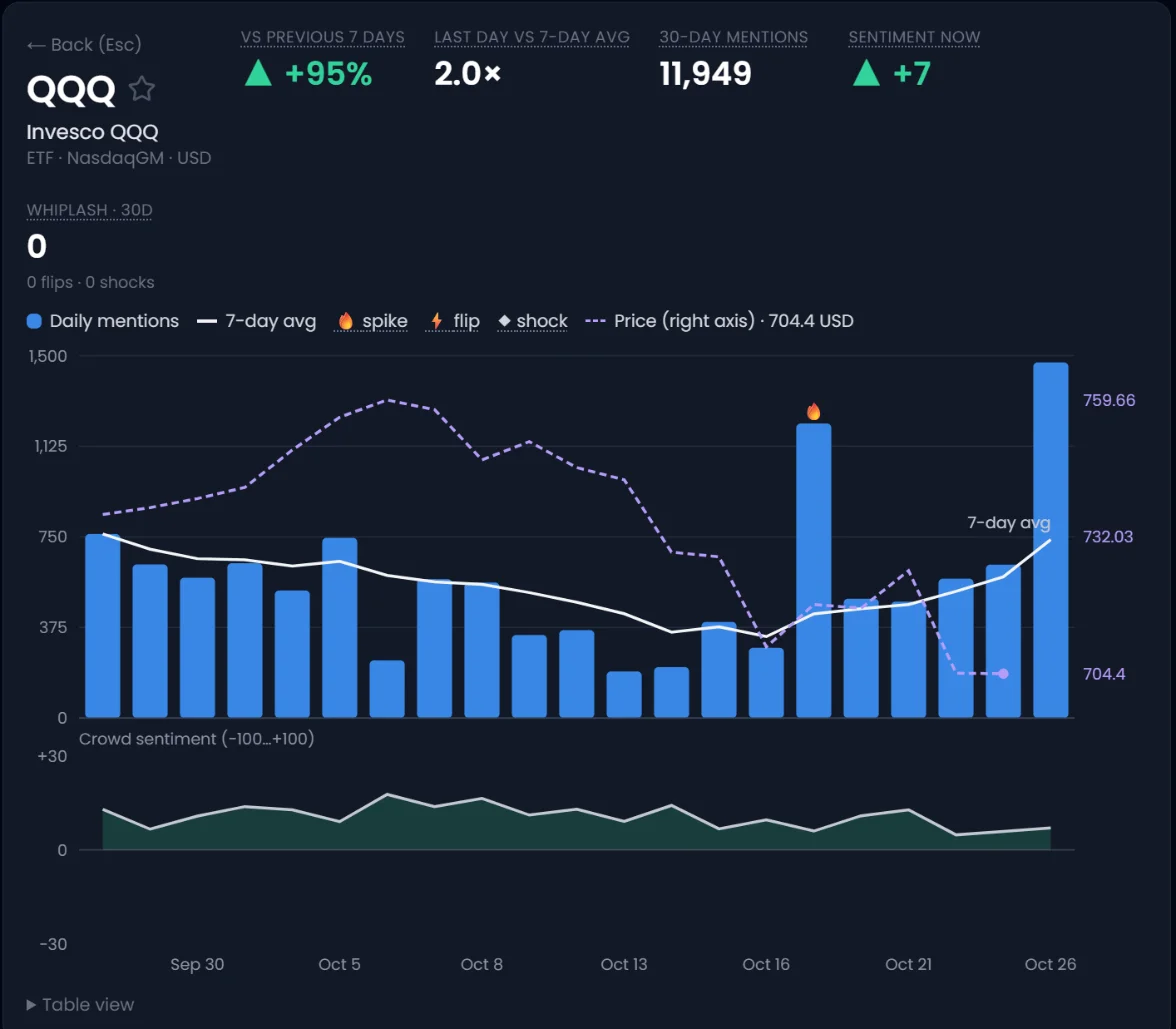
CrowdPulse shows how loudly the crowd talks about each ticker, day by day for the last 30 days, and where its mood changed sharply. It shows what the crowd says. It is not a buy or sell call.
- Pick a view: Top 20, All tickers, Favorites, or Single ticker.
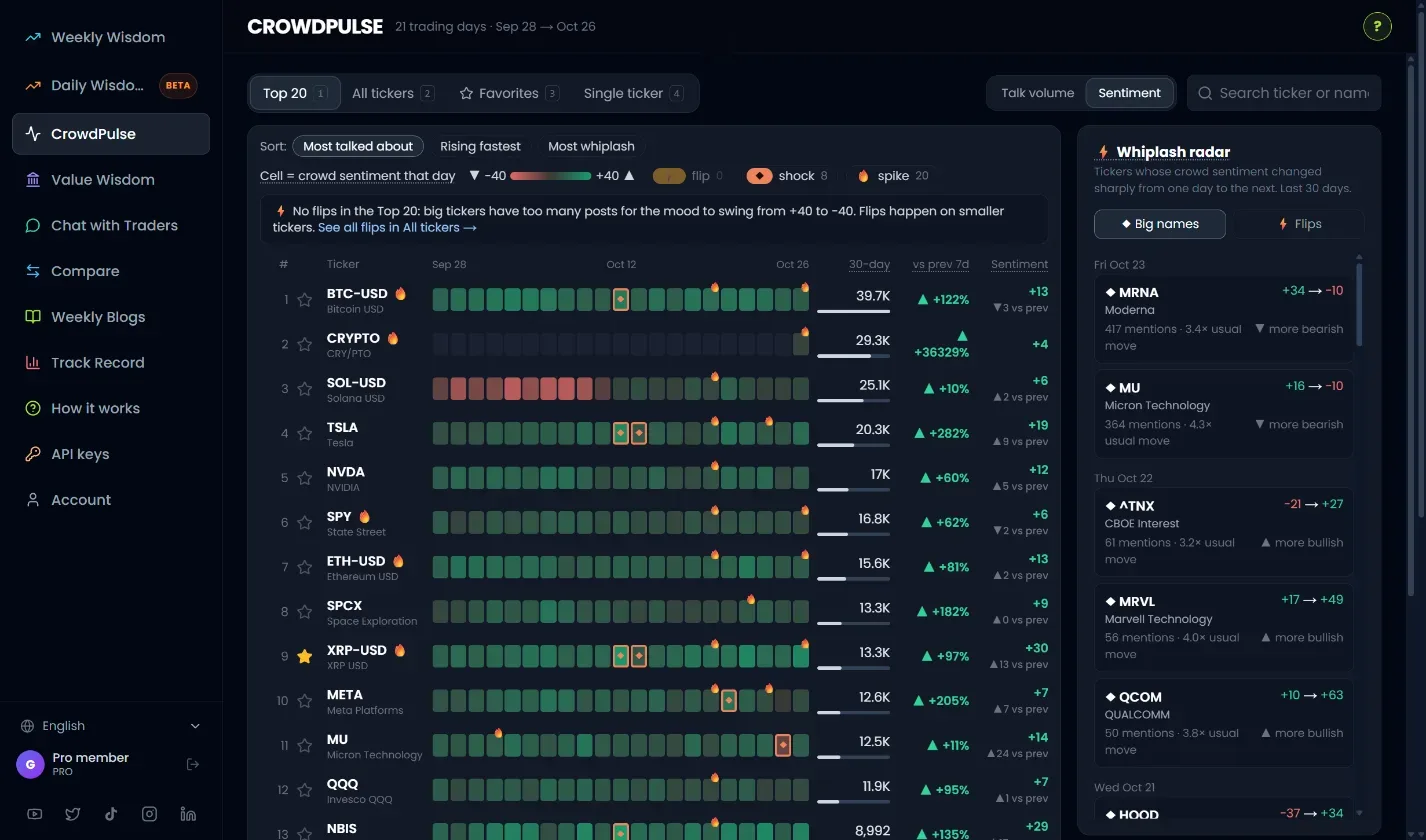
- Choose what the colors mean: Talk volume (how loud) or Sentiment (bullish or bearish).
- Sort by Most talked about, Rising fastest, or Most whiplash.
- Click a chip to show only tickers with a ⚡ flip, ◆ shock or 🔥 spike.
- Click any ticker for its full chart: mentions, 7-day average, price and sentiment.
- Check the Whiplash radar on the right for the latest sharp mood changes.
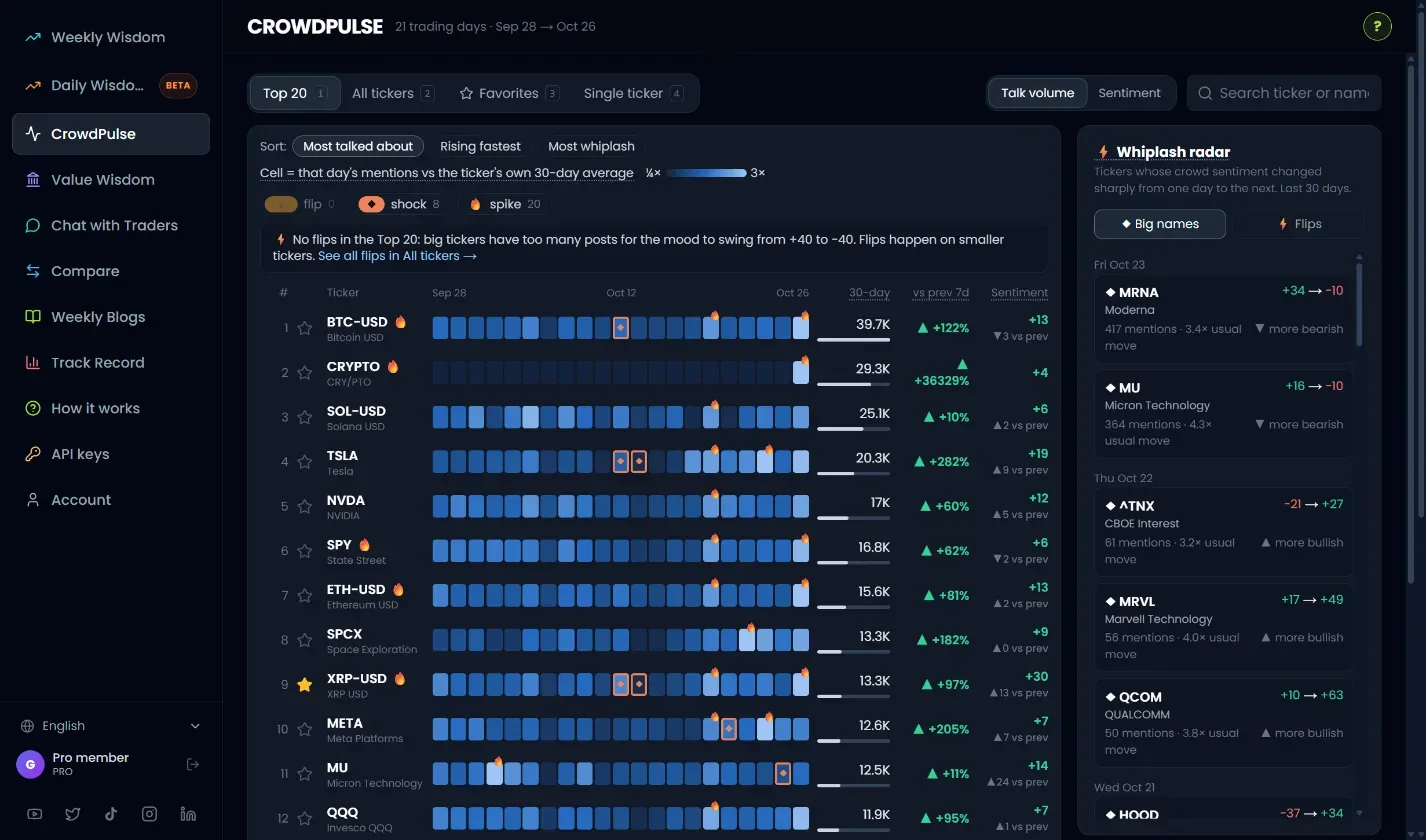
- 1Views. Top 20, All tickers, Favorites, Single ticker.
- 2Color by. Talk volume or Sentiment.
- 3Sort. Most talked about, Rising fastest, Most whiplash.
- 4Event chips. ⚡ Flip: mood swung bullish to bearish (or back) in a day. ◆ Shock: a big ticker's mood moved 3× more than usual. 🔥 Spike: at least 2× the usual talk.
- 5The grid. One square per day, oldest on the left. Hover a square for that day's numbers.
- 6The numbers. 30-day mentions, change vs the previous 7 days, and today's sentiment (−100 to +100).
- 7Whiplash radar. Latest sharp mood changes across all tickers. Click one to open it.
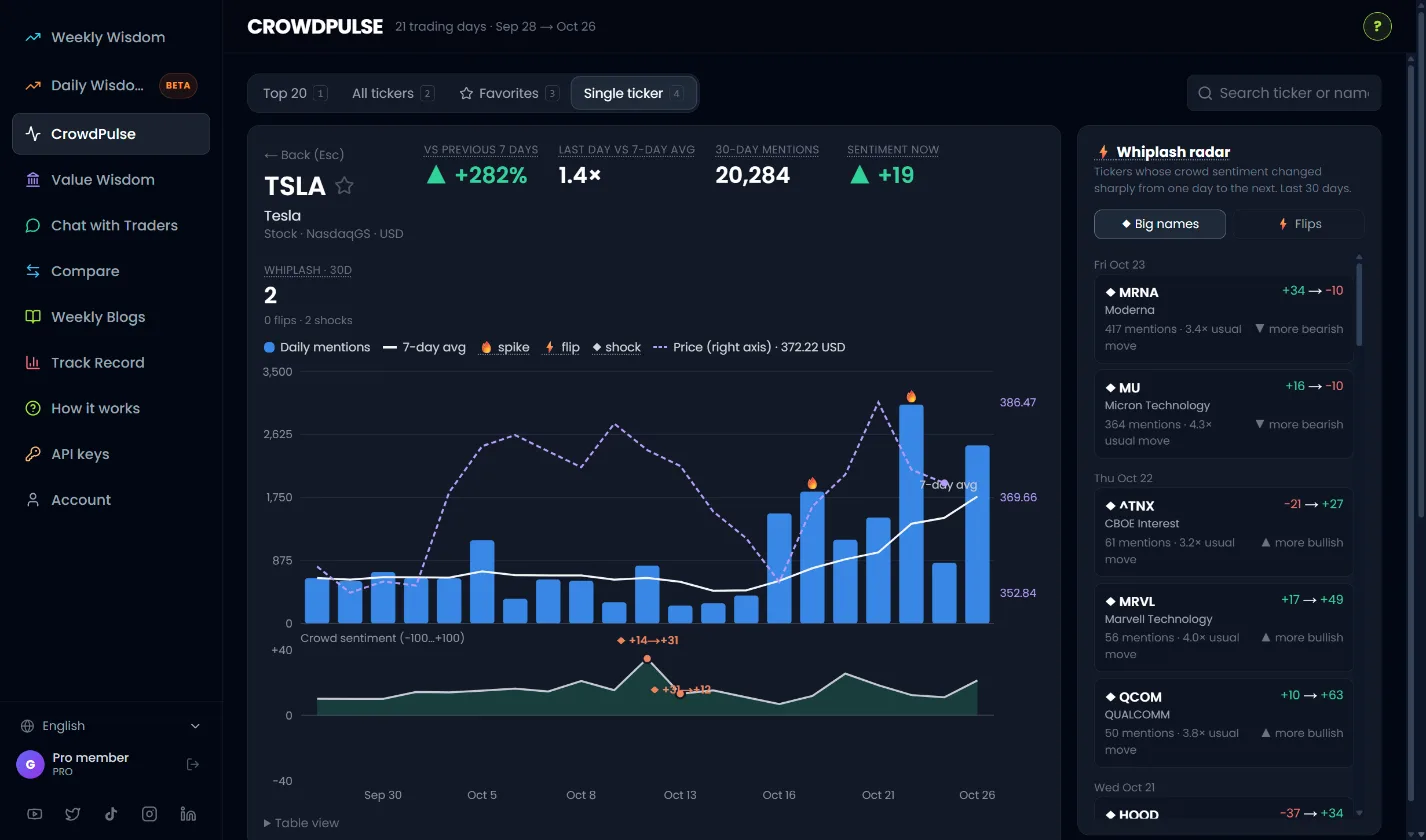
- 1Key numbers. Talk vs the previous week, last day vs average, 30-day mentions, sentiment now.
- 2Mentions and price. Blue bars = daily mentions. White line = 7-day average. Dashed purple = closing price.
- 3Crowd sentiment. The mood line from −100 to +100, with shocks and flips marked.
Chat with Traders: ask the crowd anything
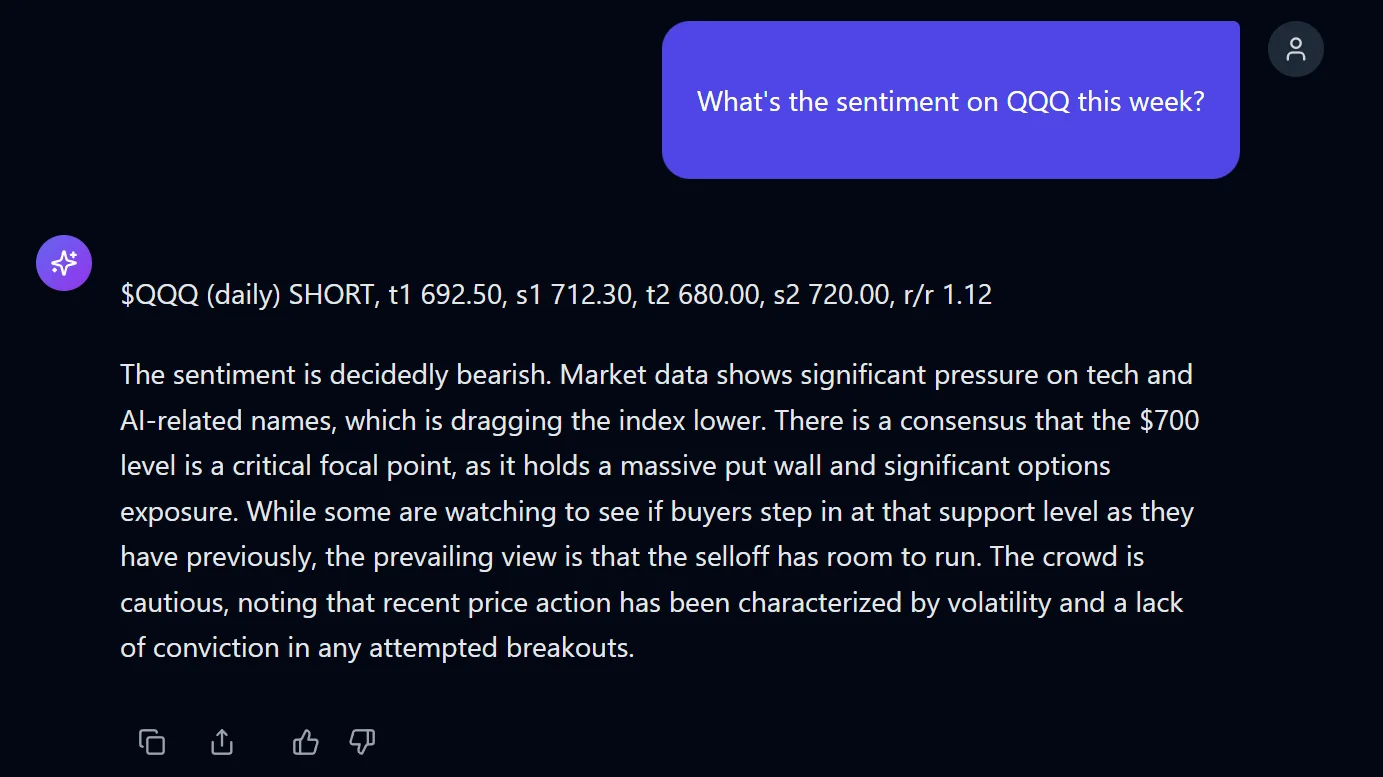
Ask a question in plain English and get an answer built from what thousands of traders posted in the last three days. When the crowd has a setup for the ticker, the answer starts with it.
- Click a suggested question, or type your own in the box at the bottom.
- Ask about one ticker, a sector, or the market: "What's the sentiment on NVDA this week?"
- Use Sources and Traders to limit the answer to certain platforms or voices.
- Switch Collective / Individual to see one combined view or each voice separately.
- Copy, share, or rate the answer. Start over with New chat.
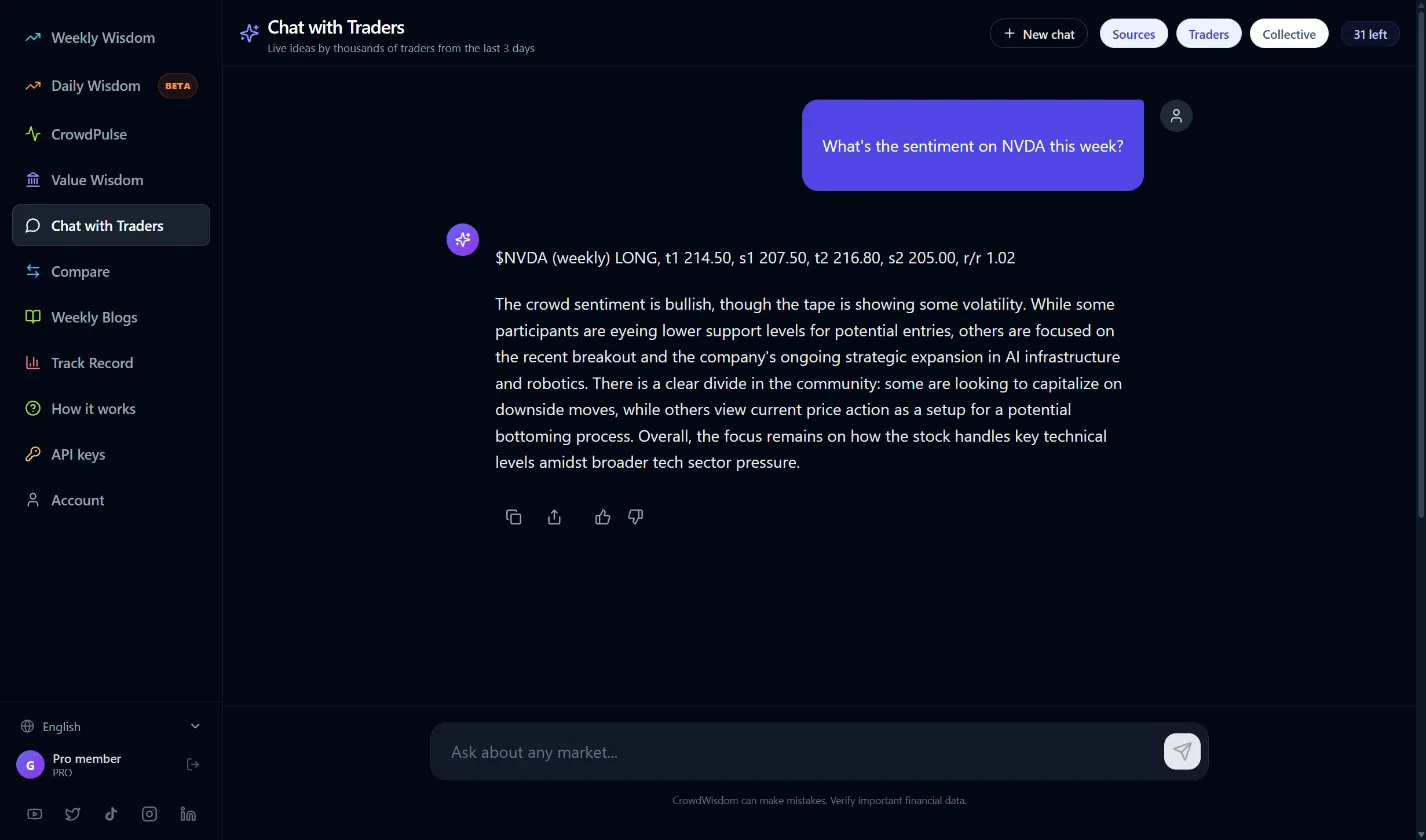
- 1Your question. Plain English. Name a ticker for the most useful answer.
- 2The setup. Direction, targets (t1, t2), stops (s1, s2) and Risk/Reward, when one exists.
- 3The crowd's view. A summary of what traders are saying and why.
- 4Copy, share, rate. Copy the answer, share a link, or tell us if it helped.
- 5Filters. Sources, Traders, and Collective vs Individual.
- 6Chats left. How many questions you can still ask.
- 7Ask box. Type a question and press Enter.
Track Record: check our results yourself
Every setup we publish is graded in public, misses included. The Track Record page shows the overall win rate, the total number of graded calls, and each call with its entry, target, stop and result.
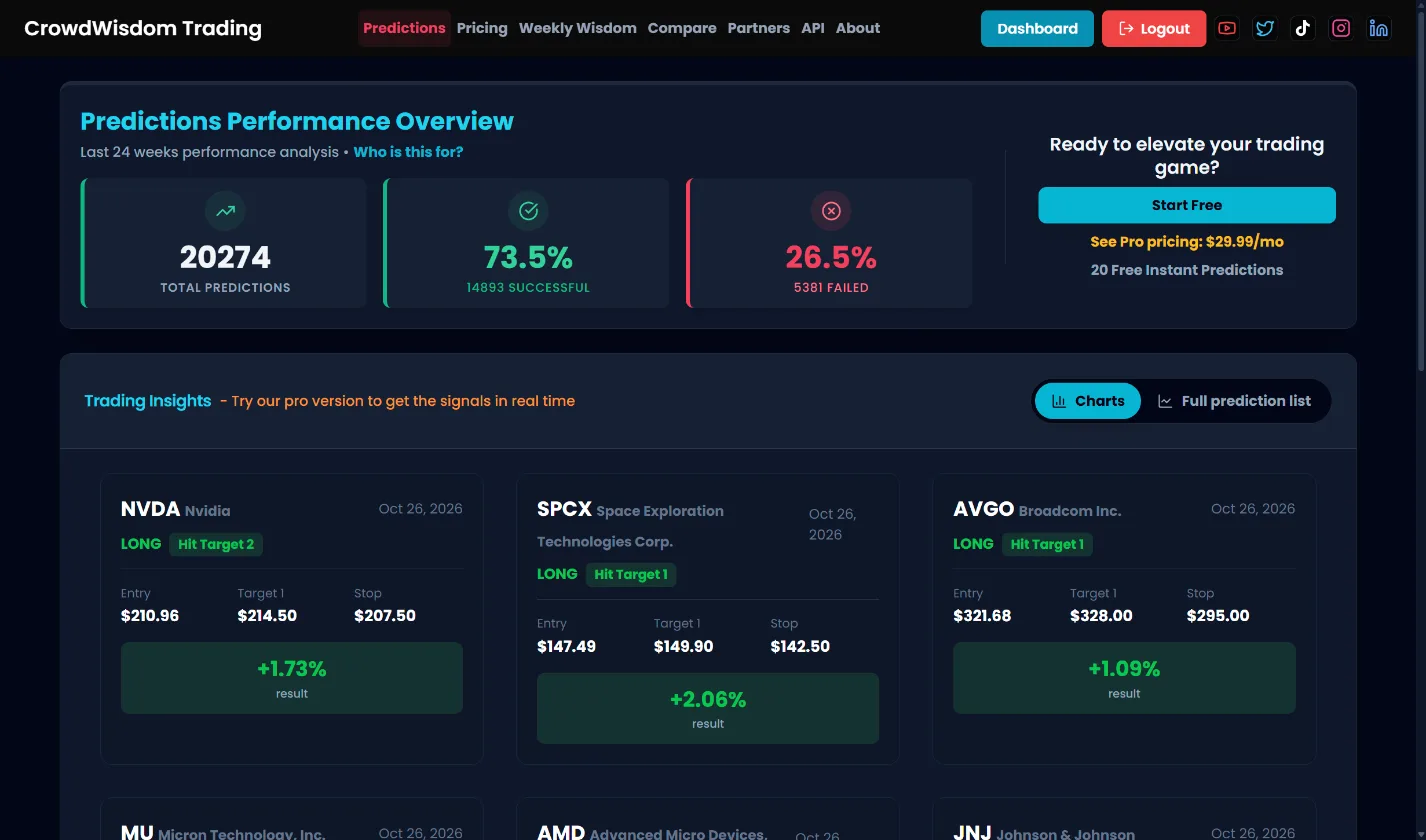
- 1The scoreboard. Total graded predictions, wins and losses.
- 2Each call. Ticker, direction, entry, target, stop and the result.
- 3Charts or full list. Switch to the full prediction list to scan every call.
Account, alerts and handy extras
Your email, plan, preview credits and subscription. Upgrade, manage billing, or change your password here.
Join our official channel for alerts and community, in 10 languages.
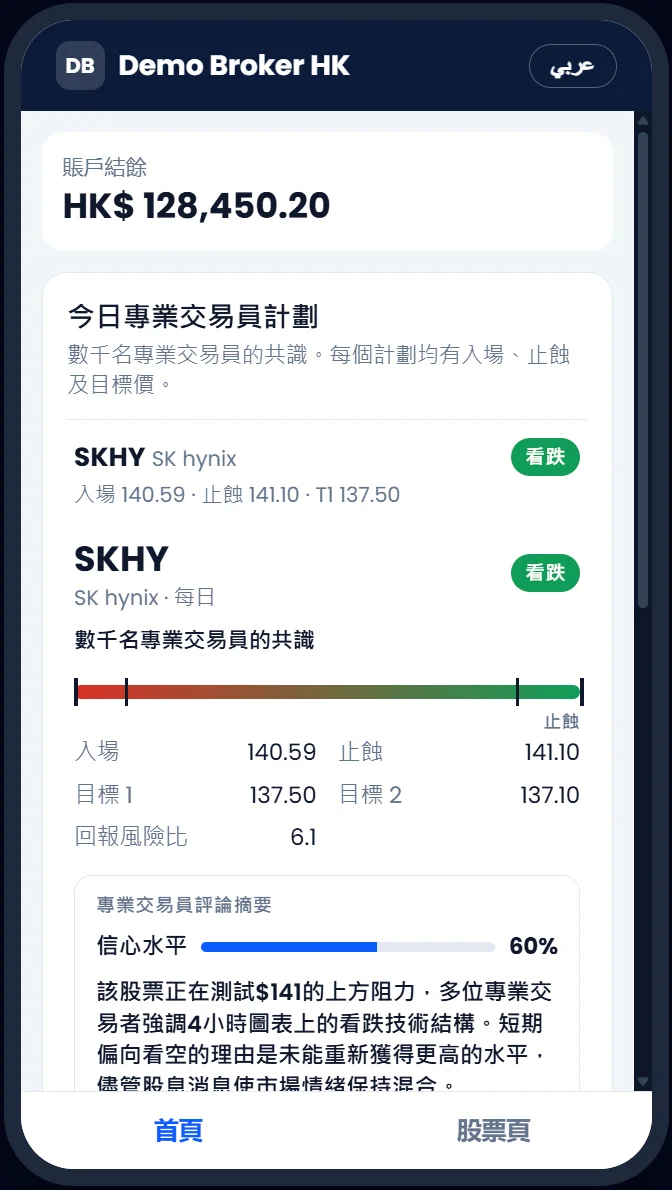
Use the dashboard in English, Arabic, Chinese, German, Hebrew, Hindi, Hungarian, Japanese, Portuguese or Russian.
One list across Weekly, Daily and CrowdPulse, saved to your account.
Send a link to a setup to a friend or colleague.
Our weekly market write-ups, free to read.
Side-by-side comparisons with other trading research tools.
A short tour of the screen you are on, any time. Or use "Take the guided tour" at the top of this guide.
For developers and firms: machine-readable setups through our Setups API (separate plan).
Free vs Pro
Start free. Upgrade when you want every setup, every day. Pro plans start at $29.99/month. See current pricing →
| Feature | Free | Pro |
|---|---|---|
| Weekly Wisdom | Cards visible · 20 full-detail previews | Unlimited |
| Daily Wisdom | Uses the same previews | Unlimited |
| Value Wisdom | Uses the same previews | Unlimited |
| Top 30 filter | — | ✓ |
| CrowdPulse | Patterns, tickers hidden | Tickers, favorites, single-ticker chart |
| Chat with Traders | Trial | ✓ |
| Track Record | ✓ (one-week delay) | ✓ |
| Weekly outlook | Weekly + daily email |
Questions people ask
Getting started
1What is CrowdWisdomTrading in one sentence?
We read what thousands of professional traders post and say, keep only the calls where they agree, and give you a ready trade plan: direction, entry, targets and stops.
2Where do I start?
Open Weekly Wisdom, find a ticker you know, and tap its card. That one screen shows the whole product: the plan, the crowd's levels, sentiment and track record.
3Do you place trades for me?
No. We are a research tool. You decide, and you place any trade with your own broker.
4Which markets do you cover?
U.S. stocks and ETFs, indices, futures, forex and crypto.
5Does it work on my phone?
Yes. Everything works in the phone browser. The menu is behind the ☰ button at the top right.
Reading a setup
6What is the difference between Target 1 and Target 2?
Target 1 is the first profit level and counts as a win. Target 2 is a further level for traders who keep part of the position running.
7What are Stop 1 and Max Stop?
Stop 1 is the normal exit if the trade goes against you. Max Stop (Stop 2) is the furthest point at which the idea is wrong. For weekly setups, hitting Stop 2 first counts as a loss.
8What does STOP → B/E mean?
Price moved 2% in the plan's direction, so the stop moved to the entry price (break-even). From here the plan should not lose money.
9What is Risk/Reward?
How much you aim to make compared with how much you risk. 2.0x means the target is twice as far from entry as the stop.
10What does Confidence mean?
How strongly the professional traders covering that ticker agree on the direction. It is not a probability of profit.
11What is a No hit?
Price reached neither the target nor the stop during the week. It is left out of the win rate but stays in the ledger. Check Run-up: you may still have been in profit.
Results and trust
12How do you count a win?
Weekly: Target 1, Target 2, or a 2% move in the forecast direction before Stop 2. Daily: Target 1 or Target 2 before Stop 1.
13Where can I check your results?
On the public Track Record page. Every call is listed with its entry, target, stop and result, misses included.
14Is past performance a promise?
No. Past results do not guarantee future results. Trading involves risk, and this is not financial advice.
Features
15Weekly or Daily: which should I use?
Weekly if you plan trades that last days. Daily if you trade during the session. Many members read Weekly on Monday and check Daily each morning.
16Who is Value Wisdom for?
Long-term investors. It answers "is this a good company to own, and at what price", not "where will it be on Friday".
17What is CrowdMap?
A chart of every price level the crowd named for one ticker over the last 30 days: targets, stops, support, resistance and entries. It shows where opinions cluster. See the CrowdMap chapter.
18What do the percentages on the Pro Crowd bar mean?
Of the pros who called a level of that type, the share who put it at that price. "78% support 699–705" means 78% of the pros who named a support put it in that range.
19Why does a ticker say "not enough data" instead of a CrowdMap?
Too few traders have named levels for it yet. The CrowdMap appears once there are levels on at least 5 days.
20What is a flip, a shock and a spike in CrowdPulse?
Flip: the mood swung from bullish to bearish (or back) in one day. Shock: a big ticker's mood moved at least 3× more than it usually does. Spike: at least twice the usual amount of talk.
21How fresh is Chat?
It reads posts and videos from the last 3 days.
22How do favorites work?
Tap the star on any card. Your starred tickers are shared across Weekly, Daily and CrowdPulse and saved to your account.
Plans and account
23What do I get for free?
20 full-detail previews, a chat trial, CrowdPulse with tickers hidden, the public Track Record, and the weekly outlook email.
24What does Pro add?
Unlimited Weekly, Daily and Value Wisdom, the Top 30 filter, the full CrowdPulse, Chat and the daily email. Plans start at $29.99/month. See Pricing for current plans.
25What uses a preview credit?
Opening the full details of a ticker you have not opened before. Opening the same ticker again does not use another credit.
26How do I cancel or change my plan?
Go to Account in the left menu. Your subscription is there, with the option to upgrade or cancel.
27Do you have an API for my company?
Yes. The Setups API gives machine-readable setups for research and internal tools. Showing the data to your own clients needs a partner license. See the API and Partners pages.
Trading words, in plain English
- Setup
- A trade plan for one ticker: direction, entry, targets and stops.
- Long / Short
- Long = expect the price to rise. Short = expect it to fall.
- Entry
- The price where the plan starts.
- Target (T1, T2)
- Prices where you take profit.
- Stop (S1, Max Stop)
- Prices where you exit to limit a loss.
- B/E stop
- Break-even stop: the stop moved to the entry price after a +2% move.
- Risk/Reward
- Potential gain divided by potential loss.
- Confidence
- How strongly the pros agree on the direction.
- Run-up
- The best move in your favor from entry during the plan.
- Drawdown
- The worst move against you from entry during the plan.
- CrowdMap
- A 30-day chart of every price level the crowd named for a ticker.
- Crowd weight
- How much of the crowd's opinion sits at a price. Not trading volume.
- Support / Resistance
- Prices where buyers (support) or sellers (resistance) are expected to show up.
- Sentiment
- The crowd's mood, from −100 (bearish) to +100 (bullish).
- Mentions
- How many times the crowd talked about a ticker.
Bring crowd setups into your platform
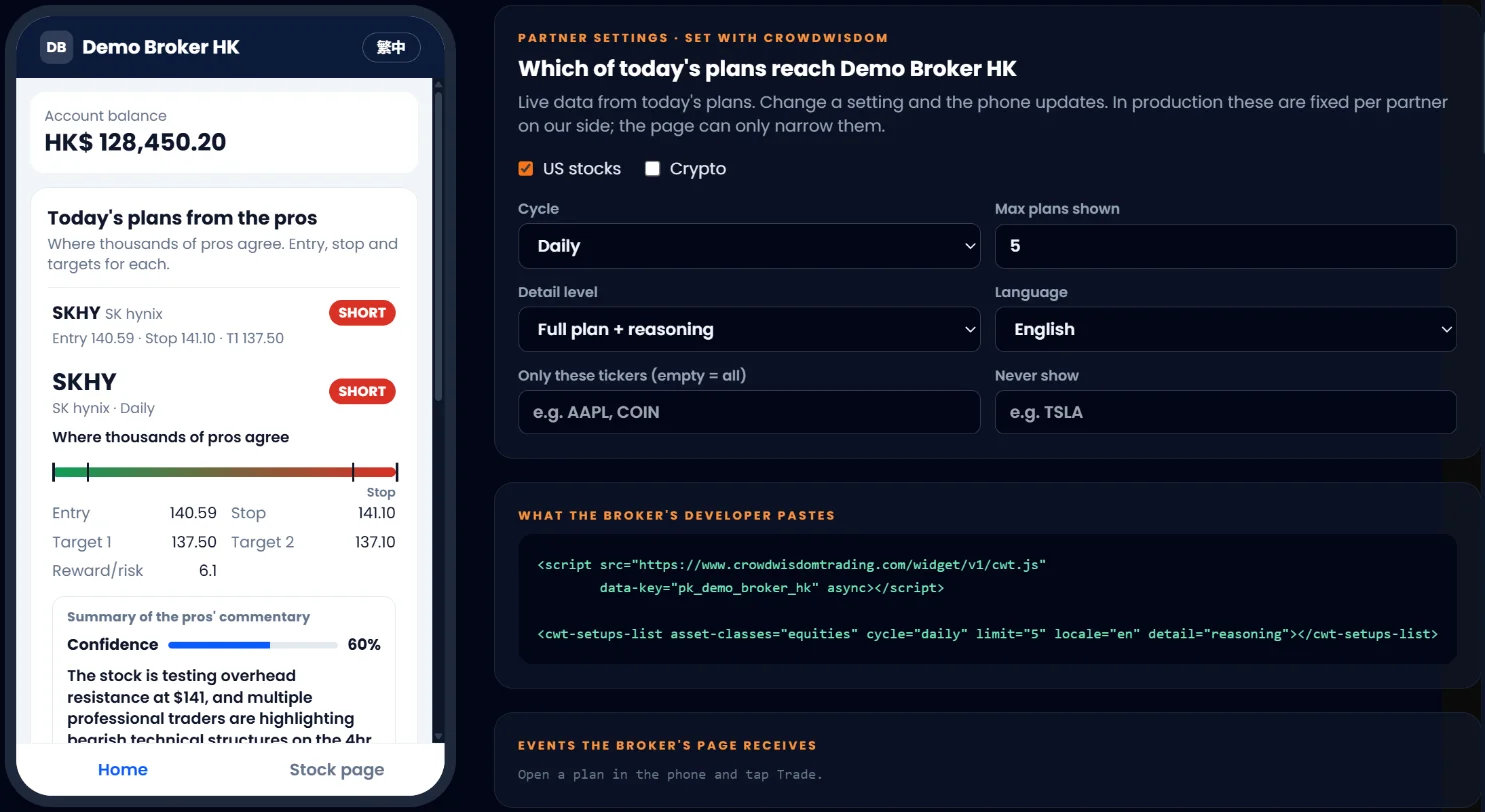
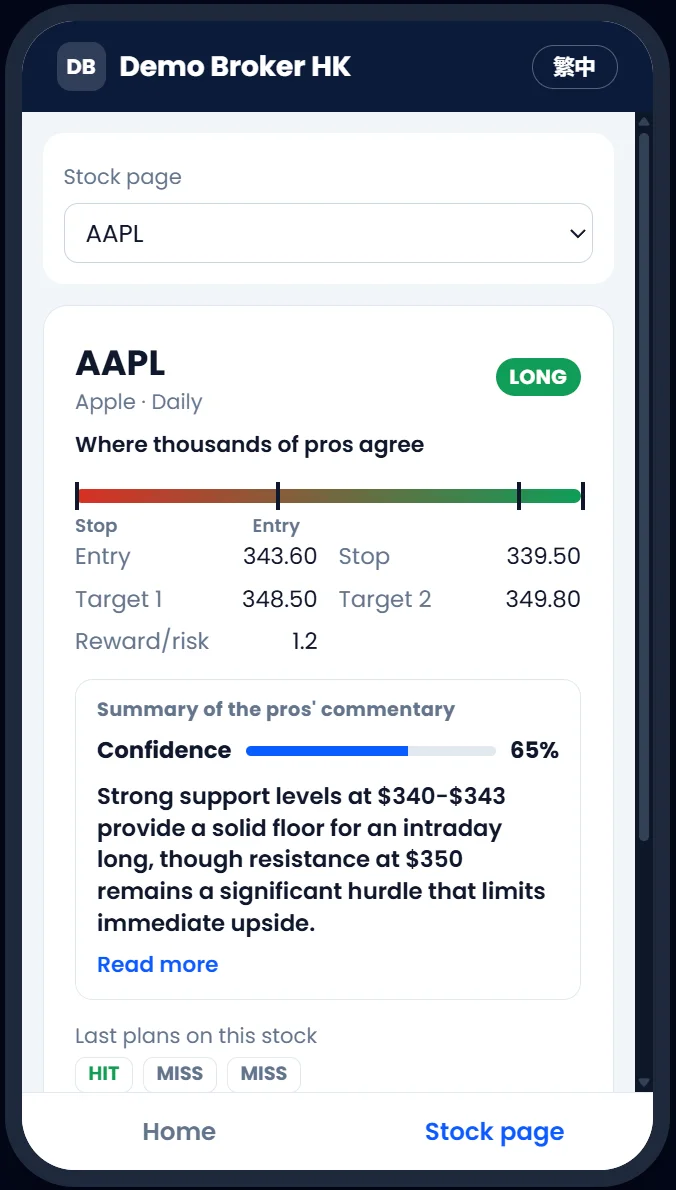
Brokers, research desks and fintech apps can use the same data. The Setups API gives machine-readable setups for research, models and internal tools. To show the data to your own clients, we offer partner licenses and a hosted widget.
CrowdWisdomTrading is an informational and educational platform. Nothing in this guide or the product is investment advice. Trading involves significant risk. Past performance does not guarantee future results. You decide, and you place any trade with your own broker. Screenshots show the live product in October 2026; numbers in them change every day.
Every widget, one ticker: QQQ
Clean captures of each real widget for Invesco QQQ, taken from the live product in October 2026. No markings, so you can see exactly what you get. Numbers change every day.
Weekly Wisdom
Week of Oct 26–30, QQQ short setup.

Full analysis
Tap a card to open these widgets, top to bottom.






Daily Wisdom
Session of Oct 26, QQQ daily short.
CrowdPulse
Last 30 trading days of QQQ talk.

Chat with Traders
A real answer to "What's the sentiment on QQQ this week?"
Value Wisdom covers individual companies, so there is no QQQ report. QQQ is not in this week's public Track Record list.